
 Safa Marwah
Microsoft has deployed a significant extended security update, designated KB5122878, for its Windows 10 operating system, targeting systems enrolled in the Extended Security Update (ESU) program and those utilizing Windows 10 Enterprise LTSC. This release is crucial for maintaining the integrity and resilience of these environments, incorporating the comprehensive suite of remediations from the most recent monthly security rollup, which notably addressed an unprecedented volume of vulnerabilities, including critical zero-day exploits actively leveraged by threat actors.
The Evolving Landscape of Windows 10 Support
The operating system lifecycle management presents a complex challenge for organizations globally, balancing the need for stability with the imperative for robust security. As Windows 10 approaches its mainstream end-of-life for most editions in October 2025, Microsoft’s Extended Security Update (ESU) program emerges as a vital, albeit temporary, lifeline for entities unable to transition to newer platforms like Windows 11 within the standard support timeframe. The KB5122878 update underscores Microsoft’s ongoing commitment to these critical legacy environments, providing essential protections against an ever-escalating threat landscape.
The ESU program is meticulously designed to offer up to three additional years of security updates for eligible Windows 10 versions, primarily targeting commercial customers, educational institutions, and government agencies. This structured extension of support is not a perpetual solution but rather a strategic bridge, allowing organizations a phased approach to migration without immediately exposing their infrastructure to unpatched vulnerabilities. Each year of the ESU program requires a separate subscription, reflecting the significant resources Microsoft dedicates to identifying, developing, and deploying security patches for an operating system beyond its standard lifecycle. This month’s KB5122878 update is a testament to this ongoing effort, ensuring that subscribers continue to receive critical safeguards.
Deep Dive into the KB5122878 Update
The KB5122878 cumulative update is specifically engineered for Windows 10 installations operating under the Extended Security Update umbrella or those running Windows 10 Enterprise LTSC (Long-Term Servicing Channel) 2021. Following its successful installation, Windows 10 systems will advance to build 19045.7725, while Windows 10 Enterprise LTSC 2021 editions will be updated to build 19044.7725. These build numbers signify the integration of all cumulative updates and security fixes released up to this point, ensuring that systems are brought to the latest possible security baseline within their respective servicing channels.
It is imperative to note that, consistent with Microsoft’s policy for Windows 10 as it nears its end of life, this update does not introduce any new functionalities or feature enhancements. Its sole purpose is to bolster the security posture and address known operational anomalies. The focus remains squarely on mitigating risks and maintaining system stability, rather than evolving the user experience or expanding capabilities. This approach aligns with the ESU program’s philosophy: to provide critical security remediation, not innovation, for systems in their extended maintenance phase.
The Significance of the Latest Patch Tuesday

A central component of the KB5122878 package is the integration of all fixes originating from the most recent "Patch Tuesday" cycle. This particular Patch Tuesday stands out due to the sheer volume and critical nature of the vulnerabilities addressed. Microsoft’s comprehensive security bulletin for the month revealed an astonishing 966 distinct security flaws across its diverse product portfolio, ranging from the Windows operating system itself to Microsoft Office, Azure services, and various developer tools.
This unprecedented number of remediations highlights several critical facets of the contemporary cybersecurity landscape:
- Persistent Threat Evolution: The continuous discovery of such a high volume of vulnerabilities underscores the relentless efforts of malicious actors to identify and exploit weaknesses in software. It also reflects the complexity inherent in modern software development, where interdependencies and vast codebases can introduce unforeseen security gaps.
- Microsoft’s Vigilance: The record-breaking count also speaks to the robust internal security research and external collaboration efforts undertaken by Microsoft. Their dedicated teams, alongside independent security researchers, are constantly probing for weaknesses, demonstrating a proactive stance in identifying and addressing potential threats before they can be widely exploited.
- Diverse Vulnerability Types: The 966 flaws encompassed a wide array of vulnerability categories. These typically include:
- Remote Code Execution (RCE): Allowing attackers to run arbitrary code on a victim’s system, often considered the most severe category.
- Elevation of Privilege (EoP): Enabling a low-privileged attacker to gain higher access levels, potentially leading to full system compromise.
- Information Disclosure: Leaking sensitive data that could be used for further attacks or espionage.
- Denial of Service (DoS): Disrupting system availability, which can have significant operational and financial impacts.
- Spoofing: Impersonating legitimate entities to trick users or systems.
- Security Feature Bypass: Circumventing security mechanisms designed to protect systems.
The Criticality of Zero-Day Exploits
Perhaps the most alarming aspect of the latest Patch Tuesday was the inclusion of fixes for two actively exploited "zero-day" vulnerabilities. A zero-day exploit refers to a software flaw that is unknown to the vendor and for which no patch has been publicly released, making it a "zero-day" since its discovery. When such a vulnerability is actively exploited in the wild, it means threat actors have already developed and are using malicious code to target systems before the vendor can issue a fix.
The presence of actively exploited zero-days within this update package elevates its importance considerably. Organizations running vulnerable systems faced an immediate and direct threat, making the rapid deployment of these patches a top priority. These types of vulnerabilities often serve as initial access vectors for sophisticated cyberattacks, including ransomware campaigns, corporate espionage, and state-sponsored intrusions. For ESU subscribers, receiving these critical zero-day fixes ensures that their extended-support Windows 10 environments are shielded from the most pressing, real-world threats.
Operational Procedures for ESU Subscribers
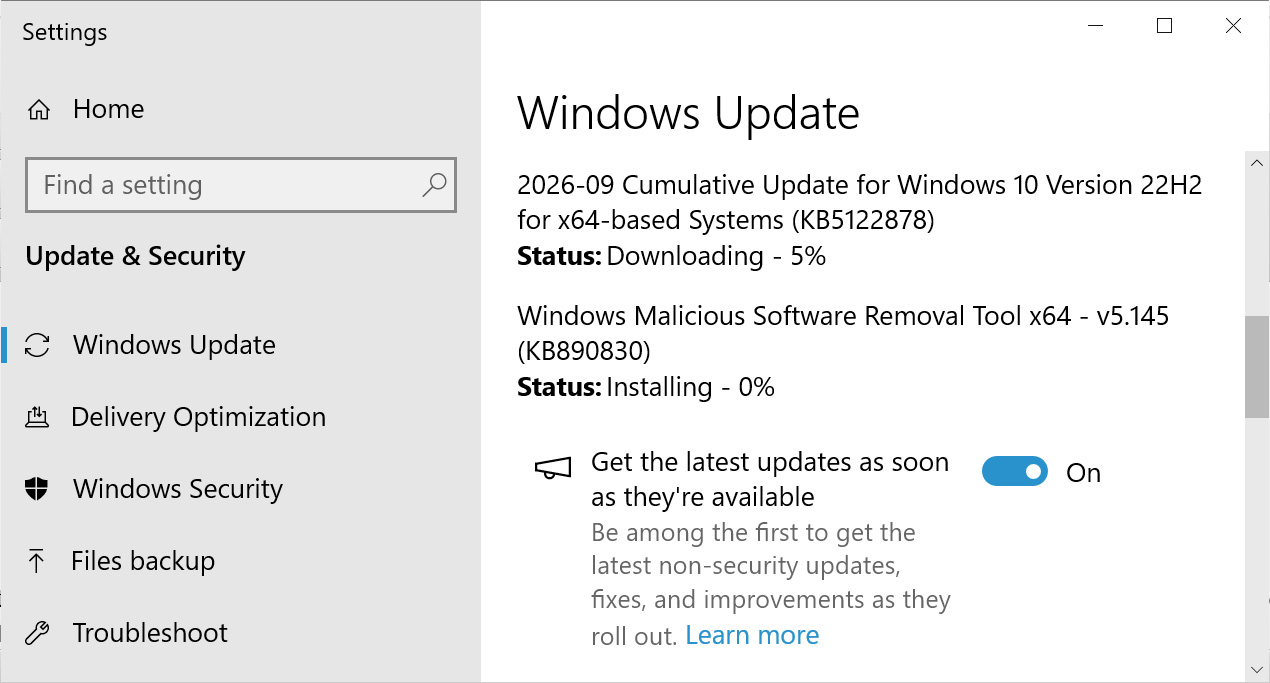
For organizations and individual users enrolled in the Windows 10 Extended Security Update program or utilizing Windows 10 Enterprise LTSC, the process for obtaining KB5122878 remains straightforward and consistent with standard Windows Update procedures. Eligible systems can acquire this update by navigating to the ‘Settings’ application, selecting ‘Windows Update,’ and then manually initiating a ‘Check for Updates.’ This action prompts the system to scan Microsoft’s update servers for available patches relevant to its configuration and ESU enrollment status, subsequently offering KB5122878 for download and installation.
It is crucial for IT administrators and users to ensure that their ESU subscriptions are active and correctly configured to receive these updates. Failure to maintain an active subscription will prevent the system from downloading and applying these essential security fixes, leaving it exposed to the vulnerabilities addressed by KB5122878. Given the critical nature of the included remediations, particularly those pertaining to actively exploited zero-day flaws, prompt application of this update is strongly advised.
Strategic Implications for IT Management
The release of KB5122878 and the context of the ESU program carry significant strategic implications for IT departments:
- Patch Management Complexity: Managing updates for systems under ESU adds another layer of complexity to an already intricate patch management strategy. IT teams must ensure that ESU subscriptions are current, deployment mechanisms are functioning correctly, and that the updates are tested for compatibility within their specific environments before broad rollout.
- Risk Mitigation vs. Migration: The ESU program provides valuable breathing room, but it should not be viewed as a long-term solution. Organizations must continue to prioritize and actively plan their migration to Windows 11 or other supported operating systems. Relying solely on ESU without a clear migration path incurs ongoing costs and potential technical debt.
- Compliance and Governance: For many industries, regulatory compliance mandates that all systems operate with up-to-date security patches. The ESU program helps organizations meet these requirements for their Windows 10 legacy systems, preventing potential fines, audits, or reputational damage associated with non-compliance.
- Resource Allocation: The decision to enroll in ESU and manage these updates requires dedicated IT resources. This includes personnel for deployment, monitoring, and troubleshooting, as well as financial allocation for the subscription itself. These resources could otherwise be directed towards modernizing infrastructure.
Broader Cybersecurity Context and Future Outlook
The continuous stream of updates like KB5122878 underscores a fundamental truth in cybersecurity: the threat landscape is dynamic and ever-present. No single patch, however comprehensive, offers a definitive end to security concerns. Instead, it forms one crucial layer within a multi-faceted defense strategy that includes robust endpoint protection, network segmentation, user education, identity and access management, and proactive threat intelligence.
For organizations still operating Windows 10 systems, especially those leveraging the ESU program, this update serves as a stark reminder of the ongoing commitment required to maintain a secure posture. While the ESU program provides essential security fixes until its conclusion (potentially September 2028 for the final year), the eventual cessation of all support for Windows 10 is inevitable. Beyond that point, any remaining Windows 10 installations will operate without official security patches, rendering them highly vulnerable to emerging threats and compliance risks.
Therefore, while KB5122878 delivers vital immediate protection, it simultaneously reinforces the strategic imperative for organizations to accelerate their transition plans to Windows 11. Migrating to a fully supported operating system ensures access to ongoing feature development, performance enhancements, and, crucially, a continuous stream of comprehensive security updates that extend beyond the lifespan of the ESU program, thereby safeguarding long-term operational resilience and digital security.


 Aura Kasih
 Lisa Mariana