Safa Marwah
Microsoft has strategically implemented significant enhancements to its Windows operating system, specifically targeting the pervasive threat of phishing campaigns that leverage malicious Remote Desktop Protocol (.rdp) configuration files. These proactive measures introduce critical user warnings and, crucially, default disabling of potentially risky shared resources, thereby strengthening the security posture against sophisticated digital intrusions.
Remote Desktop Protocol (RDP) stands as a foundational technology in modern enterprise environments, enabling seamless connectivity to remote systems. Its inherent utility lies in allowing system administrators and end-users alike to interact with distant computers as if they were physically present. A key feature facilitating this remote interaction is the .rdp file, a small configuration file that encapsulates all the necessary parameters for establishing an RDP session. These parameters can include the target IP address or hostname, user credentials (though less common for direct storage), and, critically, instructions for automatically redirecting local resources such as drives, printers, and the clipboard to the remote host. While immensely convenient for legitimate administrative tasks, this very functionality has become a significant vector for exploitation by malicious actors seeking unauthorized access and data exfiltration.
The escalating trend of RDP file abuse underscores a persistent challenge in cybersecurity: the weaponization of legitimate tools for nefarious purposes. Threat actors, ranging from financially motivated cybercriminals to highly sophisticated nation-state groups, have increasingly recognized the efficacy of exploiting RDP files in their phishing endeavors. By crafting seemingly innocuous RDP files and distributing them via deceptive email campaigns, attackers aim to trick victims into initiating connections to attacker-controlled infrastructure. Once such a connection is established, the pre-configured redirection of local resources grants the adversary a direct conduit into the victim’s local machine, enabling a broad spectrum of malicious activities.
A notable example of this sophisticated exploitation comes from the Russian state-sponsored Advanced Persistent Threat (APT) group known as APT29, often referred to as Nobelium or Cozy Bear. This group has a well-documented history of employing highly targeted and stealthy tactics, including the use of rogue RDP files, to remotely compromise systems and steal sensitive data and credentials. Their operations often focus on governmental, diplomatic, and critical infrastructure targets, highlighting the severe national security implications of such attack vectors. The ability to redirect local drives through a compromised RDP connection allows these adversaries to browse, exfiltrate, or manipulate files stored on the victim’s local disk. Beyond direct file access, the redirection capability extends to capturing clipboard data, which can contain sensitive information like passwords, encryption keys, or proprietary text copied by the user. Furthermore, advanced attacks can even redirect authentication mechanisms, such as smart cards or Windows Hello, effectively allowing the attacker to impersonate the user and bypass robust multi-factor authentication systems. These capabilities transform a seemingly benign RDP file into a potent initial access and lateral movement tool within a targeted network.
The Evolution of RDP Security: Microsoft’s New Defenses
Recognizing the evolving threat landscape, Microsoft has rolled out a suite of new protections designed to mitigate the risks associated with malicious RDP connection files. These enhancements were integrated into the April 2026 cumulative updates for Windows 10 (specifically KB5082200) and Windows 11 (KB5083769 and KB5082052), marking a significant step in bolstering the operating system’s resilience against RDP-based phishing. The core philosophy behind these updates is to inject critical security awareness and control at the point of interaction, empowering users to make more informed decisions before establishing potentially dangerous remote connections.
Microsoft’s official documentation explicitly warns against the misuse of RDP files by malicious actors who distribute them via phishing emails. The company highlights the insidious nature of these attacks, where a victim, upon opening a malicious RDP file, unwittingly initiates a silent connection to an attacker-controlled server. This connection, unbeknownst to the user, simultaneously shares local resources, granting the attacker unfettered access to the victim’s files, credentials, and other sensitive data. The new protections aim to disrupt this silent compromise by introducing explicit user prompts and stricter default settings.
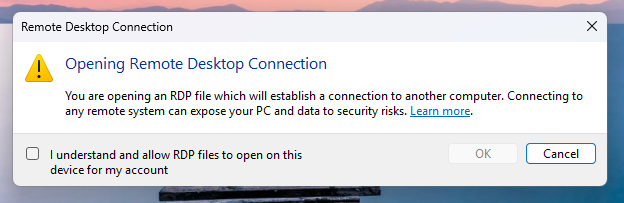
Upon the very first attempt to open an RDP file after these updates are installed, users will encounter a novel, one-time educational prompt. This dialog serves as a crucial security awareness tool, elucidating what RDP files are, their legitimate uses, and, critically, the inherent security risks associated with opening them from untrusted sources. This educational intervention is designed to equip users with foundational knowledge before they encounter specific security warnings. Users are required to acknowledge their understanding of these risks by pressing "OK," after which this initial educational alert will no longer appear. This "just-in-time" learning approach is a fundamental component of modern security strategies, aiming to educate users precisely when they need to make a security-relevant decision.
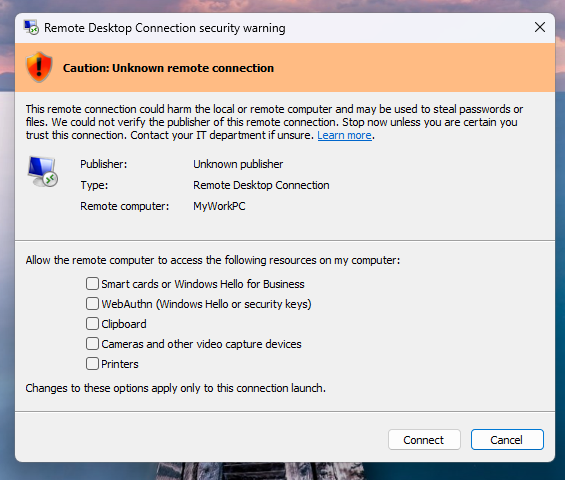
Following this initial educational phase, subsequent attempts to open any RDP file will trigger a more detailed security dialog before any connection is initiated. This comprehensive dialog provides users with critical information necessary to assess the trustworthiness of the impending connection. Key elements displayed include:

- Digital Signature Verification: The dialog clearly indicates whether the RDP file has been digitally signed by a verified publisher. This is a crucial indicator of authenticity and integrity. A digitally signed file offers a level of assurance that the file has not been tampered with since its creation by the indicated publisher.
- Remote System Address: The precise network address of the remote system to which the connection will be attempted is prominently displayed. This allows users to verify if the target address aligns with their expectations or if it points to an unknown or suspicious destination.
- Local Resource Redirections: A comprehensive list of all local resources that the RDP file intends to redirect to the remote host is presented. This includes, but is not limited to, local drives, the clipboard, and other connected devices. Critically, every single one of these redirection options is disabled by default. This "deny by default" posture significantly reduces the attack surface, requiring explicit user consent for each potentially risky resource sharing action.
The system further differentiates its warnings based on the file’s digital signature status. If an RDP file lacks a digital signature, Windows will display a prominent "Caution: Unknown remote connection" warning, explicitly labeling the publisher as "Unknown." This unambiguous warning signals to the user that there is no verifiable origin for the file, making it inherently more suspicious. Conversely, if an RDP file is digitally signed, Windows will display the publisher’s identity but will still issue a warning, advising the user to independently verify the legitimacy of the publisher before proceeding with the connection. This nuanced approach acknowledges that even signed files can originate from compromised or deceptive entities, emphasizing the user’s ultimate responsibility in vetting the source.
It is imperative to note a crucial distinction: these newly implemented protections apply exclusively to connections initiated by opening RDP files. They do not extend to connections established directly through the Windows Remote Desktop client application. This implies that while the attack surface from phishing-delivered RDP files is significantly curtailed, users initiating direct connections must still rely on existing security practices and awareness.
For organizational flexibility, Microsoft has provided a temporary mechanism for administrators to disable these new protections. This can be achieved by modifying the RedirectionWarningDialogVersion value to 1 within the HKLMSoftwarePoliciesMicrosoftWindows NTTerminal ServicesClient Registry key. However, given the historical and ongoing abuse of RDP files in cyberattacks, Microsoft strongly advises against disabling these critical safeguards, emphasizing that maintaining them is paramount for a robust security posture.
Deeper Analysis and Implications
The introduction of these enhanced RDP protections by Microsoft represents a significant defensive upgrade, reflecting a deeper understanding of current threat actor methodologies and the critical role of user interaction in preventing successful compromises. This move aligns with a broader industry trend towards "security by default" and "zero trust" principles, where potential risks are mitigated unless explicitly permitted.
From an analytical perspective, these protections operate on several crucial layers:
- User Education and Awareness: The initial educational prompt is a commendable step. Many users, even in enterprise settings, may not fully grasp the underlying mechanisms or potential dangers of RDP files. By providing this context at the point of interaction, Microsoft attempts to shift the paradigm from blind trust to informed consent.
- Reduced Attack Surface by Default: The default disabling of local resource redirection is arguably the most impactful technical change. Threat actors often rely on the automatic nature of these redirections to quickly exfiltrate data or establish persistence. By requiring explicit user action, the window of opportunity for silent compromise is drastically narrowed. This directly addresses the "living off the land" technique where adversaries exploit legitimate system features for malicious ends.
- Enhanced Transparency: The detailed security dialog provides unprecedented transparency regarding the RDP connection’s parameters. Displaying the remote address, publisher information, and specific resource redirections allows users (and security teams) to quickly identify anomalies. The digital signature check, while not foolproof, adds a layer of verifiable trust that was previously absent in the user’s immediate decision-making process.
- Targeting a Specific, High-Impact Vector: While RDP itself is a legitimate tool, the use of RDP files as a phishing vector has been consistently exploited by various threat groups, including highly sophisticated APTs. By focusing protections here, Microsoft addresses a specific and well-defined attack chain that has proven successful.
However, it is also important to consider the limitations and potential challenges. The success of these protections heavily relies on user vigilance. "Click fatigue" is a known phenomenon where users, bombarded with security warnings, may develop a habit of clicking through them without fully comprehending the implications. The educational prompt, while valuable, is a one-time event, and ongoing security awareness training remains indispensable. Furthermore, threat actors are adaptive. While RDP file-based phishing may become less effective, they may pivot to other initial access vectors, or attempt to compromise systems in ways that bypass these file-centric protections (e.g., direct RDP client compromise, exploiting other vulnerabilities).
For organizations, the implications are generally positive. A reduced risk from RDP file-based phishing means fewer successful initial compromises, which translates to fewer data breaches and less operational disruption. However, these protections should be viewed as one component of a holistic cybersecurity strategy. Robust endpoint detection and response (EDR) solutions, comprehensive security awareness training programs, strong identity and access management (IAM) policies, and network segmentation remain critical. Administrators should review their policies regarding RDP file usage and ensure that users are educated on the new prompts. The ability to temporarily disable these protections, while offering flexibility, also presents a potential risk if not managed with extreme caution.
Future Outlook
The continuous evolution of cyber threats necessitates an equally dynamic approach to security. While these RDP file protections are a significant step, the cat-and-mouse game between defenders and attackers will undoubtedly continue. Future enhancements could potentially include:
- Integration with Direct RDP Client: Extending similar warning mechanisms and default-disabled resource redirections to connections initiated directly through the Remote Desktop Connection client could further enhance security.
- Granular Policy Controls: Providing more granular administrative controls over RDP file handling, perhaps through Group Policy or Intune, could allow organizations to tailor protections to their specific risk profiles and operational needs.
- Threat Intelligence Integration: Leveraging real-time threat intelligence to flag known malicious RDP server addresses or patterns could provide an additional layer of proactive defense.
- User Behavior Analytics: Integrating these warnings with broader user behavior analytics could help identify patterns of suspicious RDP file interaction within an enterprise, alerting security teams to potential compromises even if a user bypasses the warnings.
Ultimately, Microsoft’s latest RDP file protections underscore a commitment to enhancing the baseline security of the Windows operating system. By directly addressing a prevalent and impactful attack vector, these updates contribute to a safer computing environment. However, they also serve as a stark reminder that technology alone cannot solve the entirety of the cybersecurity challenge. A combination of robust technical controls, continuous user education, and adaptive security strategies will remain essential in the ongoing effort to defend against sophisticated and evolving cyber threats.




 Aura Kasih
 Ayu Aulia