Safa Marwah
A recent update to the Microsoft Edge browser has inadvertently introduced a significant software defect, causing a widespread disruption to the fundamental right-click paste functionality within the Microsoft Teams desktop application. This technical anomaly has rendered users unable to seamlessly transfer content, including text, URLs, and images, into Teams chat interfaces via the conventional context menu, prompting concerns regarding productivity and user experience across a vast user base.
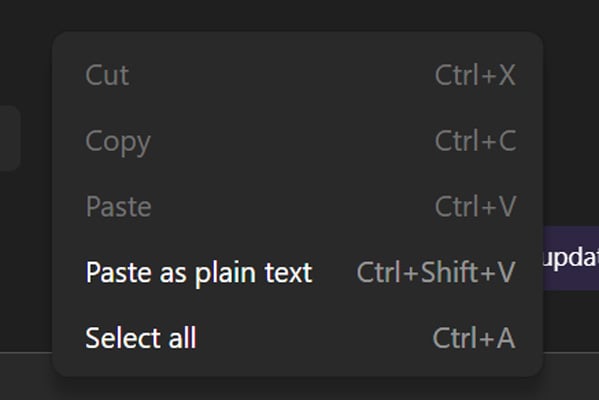
Microsoft formally acknowledged the issue in an advisory issued on April 14, detailing reports from users encountering a greyed-out "Paste" option when attempting to utilize the right-click context menu within Teams chats. This defect, while seemingly minor, impedes a commonly used interaction pattern critical for efficient communication and content sharing in the collaborative platform. The Redmond-based technology giant has attributed the problem to a "code regression" originating from a recent Edge browser update, which demonstrably impacts the underlying components utilized by the Teams desktop client.
The operational interdependence between Microsoft Teams and the Edge browser’s rendering engine, specifically components like WebView2, means that updates to one can have cascading effects on the other. Modern desktop applications frequently leverage web technologies for their user interfaces and integrated functionalities, aiming for consistency across platforms and faster development cycles. In this instance, a modification within the Edge browser’s codebase inadvertently created a conflict or incompatibility that directly manifested as a broken feature in the Teams desktop client. This intricate relationship underscores the complex challenges inherent in maintaining a cohesive and stable software ecosystem, where continuous updates across multiple interconnected products must be meticulously managed and tested to prevent unforeseen regressions.
For immediate mitigation, Microsoft has advised affected users to bypass the right-click menu limitation by employing keyboard shortcuts for copying and pasting operations. Windows users can utilize ‘Ctrl + C’ to copy and ‘Ctrl + V’ to paste, while macOS users can employ ‘Cmd + C’ and ‘Cmd + V’ respectively. While these keyboard shortcuts provide a functional workaround, they do not resolve the underlying issue and can introduce friction into the workflow for individuals accustomed to or reliant on the right-click context menu for rapid content manipulation. This shift in interaction pattern, though seemingly trivial, can cumulatively impact productivity, particularly for users who frequently share diverse content types within Teams chats throughout their workday. The reliance on muscle memory for common tasks means that even a small deviation can lead to momentary interruptions, requiring conscious effort to adapt and potentially slowing down communication flows.
The scope of this issue extends beyond individual users, significantly impacting corporate environments where Microsoft Teams serves as a mission-critical communication and collaboration hub. Reports from IT administrators on various online communities, including Reddit and Microsoft’s own support forums, corroborate the widespread nature of the problem. These administrators have highlighted the direct effect on their users, noting the inability to right-click paste while confirming that keyboard shortcuts remain functional. Such incidents invariably lead to an increase in helpdesk tickets, diverting valuable IT resources to troubleshoot and communicate workarounds for a fundamental application feature. The inability of standard troubleshooting steps, such as reinstalling Teams or clearing the application cache, to resolve the problem further indicates the systemic nature of the bug, rooted deeper within the interconnected software architecture rather than localized application data.
From a software development and quality assurance perspective, this incident illuminates the inherent complexities of continuous integration and continuous delivery (CI/CD) pipelines, particularly when dealing with tightly coupled applications. Modern software development cycles prioritize rapid iteration and frequent updates, which, while beneficial for feature delivery and security patching, inherently increase the risk of introducing regressions. The challenge lies in comprehensive regression testing that can account for every possible interaction and dependency across an evolving ecosystem. In this case, it appears that a specific code change in Edge, likely intended for browser-specific functionality, had an unintended side effect on how Teams, leveraging Edge’s underlying components, handles paste operations. This highlights the need for robust cross-product testing frameworks and potentially more granular feature flagging to isolate and test changes before broad deployment.

The user experience (UX) implications are also significant. The right-click context menu is a deeply ingrained interaction paradigm, offering discoverability and efficiency. Its sudden malfunction in a primary communication tool like Teams can cause frustration, diminish user trust in the software’s reliability, and ultimately impact overall user satisfaction. For organizations that have invested heavily in Microsoft’s ecosystem, such disruptions can translate into tangible costs through lost productivity and increased support overhead. The expectation among users is that core functionalities, especially those as fundamental as copy-paste, should operate flawlessly and consistently.
Microsoft has affirmed that it has successfully identified the root cause of the defect and is actively rolling out a corrective fix. This deployment is being conducted in stages, a common practice designed to manage the risks associated with broad software updates. Staged rollouts allow vendors to monitor real-time telemetry and user feedback from a smaller subset of users before expanding the fix to the entire user base. This cautious approach helps to identify and mitigate any unforeseen issues that the fix itself might introduce, ensuring a more stable overall resolution. However, as of the latest public update on April 16, Microsoft has not provided a definitive timeline for when the fix will be fully deployed to all affected users. This lack of a precise schedule can create uncertainty for IT departments planning their internal communications and support strategies.
Looking ahead, this incident serves as a critical case study for lessons learned in managing complex software interdependencies. For Microsoft, it may prompt a re-evaluation of the testing protocols for Edge updates concerning their impact on dependent applications like Teams. Enhanced automated testing frameworks, more extensive internal canary deployments, and perhaps even dedicated cross-product compatibility teams could be vital in preventing similar occurrences. The increasing reliance on web-based components within desktop applications necessitates a holistic approach to quality assurance that transcends individual product boundaries.
For IT management teams, this event underscores the importance of staying informed about vendor advisories, maintaining robust internal communication channels, and being prepared with immediate workarounds for common user issues. It also highlights the value of monitoring online communities for early indicators of widespread problems, often before official advisories are widely disseminated. Proactive communication with end-users about known issues and available workarounds can significantly alleviate user frustration and reduce the burden on support staff.
In conclusion, while the right-click paste bug in Microsoft Teams, stemming from an Edge update, may appear to be a minor technical glitch, its widespread impact on daily productivity and user experience underscores the intricate and often fragile nature of modern software ecosystems. The incident highlights the continuous challenge faced by major software vendors in balancing rapid innovation and frequent updates with the imperative of maintaining seamless functionality across deeply interconnected applications. As the digital landscape continues to evolve with increasingly integrated platforms, the meticulous management of software interdependencies and robust quality assurance processes will remain paramount for ensuring a stable and productive environment for users worldwide. The ongoing rollout of a fix, while a welcome development, reinforces the critical need for vigilance and adaptive strategies in both software development and IT management.




 Aura Kasih
 Ayu Aulia