Safa Marwah
Microsoft has addressed a notable issue impacting Windows 11 users, where the password sign-in option would intermittently vanish from the lock screen, significantly disrupting the user authentication process. This critical fix, delivered via the latest optional cumulative update, aims to restore consistent and reliable access for affected individuals.
The core of the problem stemmed from a specific behavioral anomaly following the installation of Windows 11 updates disseminated since August 2025. Users attempting to access their systems encountered a scenario where the familiar password icon, typically present among various authentication methods on the lock screen, was conspicuously absent. This impediment posed a considerable challenge, particularly for those accustomed to or reliant solely on password-based entry.
Further investigation into the bug revealed its nuanced manifestation. While the password icon is designed to appear when multiple sign-in options—such as a Personal Identification Number (PIN), security key, or biometric authentication like a fingerprint—are configured, its absence became problematic even in such multi-option setups. Conversely, if a user had configured only a password for system access, the password field would generally be displayed by default, thus masking the issue for single-password users. However, the more critical scenario emerged for users with diverse authentication choices enabled on Windows 11 24H2 or 25H2 systems, especially those who had applied the August 2025 KB5064081 non-security preview update or any subsequent releases. For this cohort, the password icon would fail to render, leading to confusion and perceived lockout.
Microsoft, acknowledging the existence of this flaw in November, had previously communicated a temporary workaround for affected users. Despite the visual disappearance of the icon, the underlying functionality remained partially intact. Users were advised that by precisely hovering their mouse cursor over the spatial area where the password icon was expected to reside, a hidden button would become interactively available. Selecting this invisible placeholder would then reveal the password input field, allowing users to proceed with their credentials and successfully log into their devices. While this workaround offered a path forward, it represented a significant degradation of the user experience, transforming a routine sign-in procedure into an exercise in precise cursor manipulation and system familiarity. The necessity of such an obscure method underscored the severity of the interface disruption.
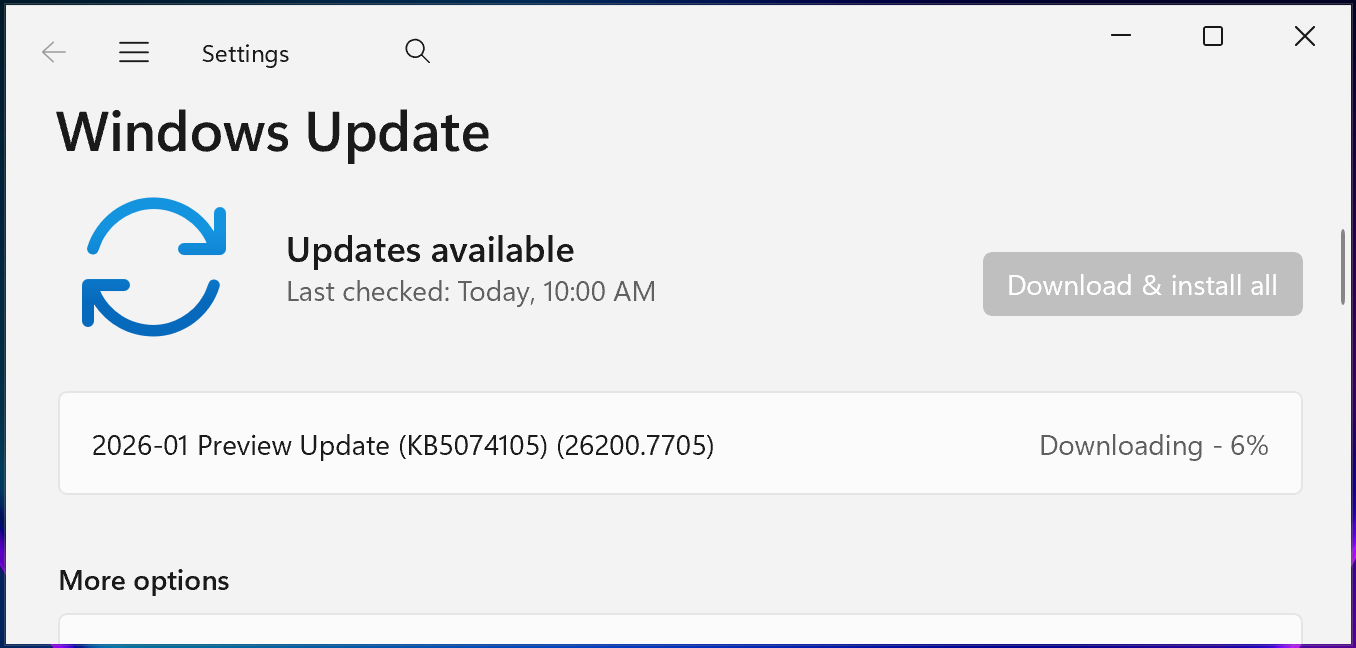
The definitive resolution for this pervasive sign-in problem has now been integrated into the January 2025 KB5074105 optional cumulative update for Windows 11 systems, which was officially released on Thursday, January 29. This update is designed to reinstate the consistent visibility of the password sign-in option, ensuring that all configured authentication methods are presented clearly and reliably on the lock screen. The availability of this fix is a critical step towards enhancing the stability and usability of the Windows 11 operating system.
Users seeking to implement this crucial update can do so through the standard Windows Update mechanism. The process involves navigating to the "Settings" application, selecting "Windows Update," and then initiating a "Check for Updates." Once the KB5074105 update is detected, users can proceed by clicking the "Download and install" link. For those who prefer manual installation or are managing multiple systems, the update is also accessible for direct download from the Microsoft Update Catalog, providing flexibility in deployment strategies.

Beyond rectifying the lock screen sign-in anomaly, the KB5074105 preview update encompasses a broader spectrum of 32 distinct improvements and bug fixes, targeting various aspects of system performance, stability, and core functionality. These enhancements reflect Microsoft’s ongoing commitment to refining the Windows 11 ecosystem. Among the notable resolutions are fixes addressing critical boot-related issues, which previously led to system instability. Specifically, the update resolves a bug that caused iSCSI boot failures, manifesting as an "Inaccessible Boot Device" error, a particularly disruptive issue for enterprise environments reliant on network-based storage solutions. Furthermore, it rectifies a problem that could cause the system to hang indefinitely during startup, especially when Windows Boot Manager debugging was enabled, thereby improving overall system resilience during initialization.
The scope of improvements extends to user experience and licensing integrity. The update mitigates a known issue where Explorer.exe, the primary file management and desktop shell process, would hang during the initial user login session, particularly when certain applications were configured to launch automatically at startup. Such occurrences often resulted in frustrating delays and a perceived lack of system responsiveness. Additionally, KB5074105 addresses a significant issue concerning Windows license migrations, which could fail during system upgrades. This failure was attributed to the PC’s inability to successfully register with the Windows Activation server for its digital license, potentially leading to activation errors and compliance concerns for users transitioning between hardware or OS versions. The cumulative effect of these fixes is a more robust, reliable, and user-friendly Windows 11 experience.
This recent fix for the password sign-in bug is contextualized within a series of post-update remediations undertaken by Microsoft following the August 2025 Windows updates. The period immediately following these updates saw a cluster of reported issues, prompting swift action from the company. In late September 2025, for instance, Microsoft addressed another significant problem linked to the KB5064081 update: widespread Digital Rights Management (DRM)-protected video playback issues. These problems manifested as interruptions, freezing, or complete black screens when users attempted to play DRM-protected content within Blu-ray, DVD, or Digital TV applications, severely impacting multimedia consumption.
During the same month, Microsoft also resolved other critical issues that had emerged as direct consequences of the August 2025 Windows updates. These included reports of severe lag and stuttering affecting Network Device Interface (NDI) streaming software across both Windows 10 and Windows 11 devices, which had considerable implications for professionals in broadcast, live production, and content creation. Furthermore, the updates had inadvertently introduced app installation problems for non-administrative Windows users, primarily due to unexpected and persistent User Account Control (UAC) prompts, which hindered software deployment and management in shared or restricted user environments. The consistent pattern of issues post-August 2025 updates and the subsequent series of fixes underscore the inherent complexities of operating system development and the continuous challenge of maintaining broad compatibility and stability across an immensely diverse hardware and software landscape.
From an analytical perspective, the recurrence of significant bugs following major update rollouts raises important considerations regarding software quality assurance and deployment methodologies. While the iterative nature of modern operating system development often necessitates frequent updates, each release carries the potential for unintended regressions. The disappearing password option, though eventually resolvable via a workaround, exemplifies how even seemingly minor graphical glitches can profoundly impact fundamental user interactions and perceptions of system reliability. For enterprise environments, such issues translate directly into increased support calls, heightened IT administrative overhead, and potential disruptions to employee productivity. The reliance on optional preview updates, such as KB5074105, for initial bug fixes highlights a strategy where early adopters and IT professionals play a crucial role in validating stability before broader mandatory rollouts. This approach, while effective in catching issues, also places a burden on these groups to proactively test and apply updates.
The resolution of these diverse issues, particularly those affecting core system functions like sign-in, boot processes, and application stability, reinforces the critical importance of robust testing protocols and responsive post-release support. As Windows 11 continues to evolve, maintaining user trust hinges on Microsoft’s ability to not only deliver innovative features but also to ensure a consistently stable and predictable computing environment. The comprehensive nature of the KB5074105 update suggests a concerted effort to address a range of accumulated issues, providing a more stable foundation for future system developments and user interactions. The ongoing commitment to identifying and rectifying such complex bugs is paramount for sustaining the platform’s integrity and user satisfaction in the long term.



 Lisa Mariana
 Aura Kasih
 Ayu Aulia