Safa Marwah
Cyber threat actors are increasingly leveraging a highly deceptive phishing methodology, known as the Browser-in-the-Browser (BitB) technique, to illicitly obtain user credentials for major social media platforms, with a notable surge observed in campaigns targeting Facebook. This advanced tactic represents a significant evolution in phishing attacks, making visual detection of malicious login prompts exceedingly difficult for the average user.
The Browser-in-the-Browser technique emerged as a sophisticated tool in the arsenal of cybercriminals following its conceptual development by security researcher mr.d0x in 2022. Designed to mimic legitimate authentication pop-up windows within a user’s web browser, BitB exploits inherent trust in familiar user interfaces. Its adoption by malicious actors has since broadened, extending beyond Facebook to compromise accounts across a spectrum of online services, including gaming platforms like Steam, highlighting its versatility and effectiveness in various credential harvesting operations.
Security researchers at Trellix, who have been actively monitoring these malicious activities, report a distinct uptick in BitB-driven campaigns over the past six months. The primary objective behind these Facebook account compromises is multifaceted: threat actors aim to propagate further scams, harvest extensive personal data for subsequent illicit activities, or engage in identity fraud. With a global user base exceeding three billion active accounts, Facebook remains an exceptionally lucrative target for sophisticated fraud schemes, offering a vast pool of potential victims and valuable data.

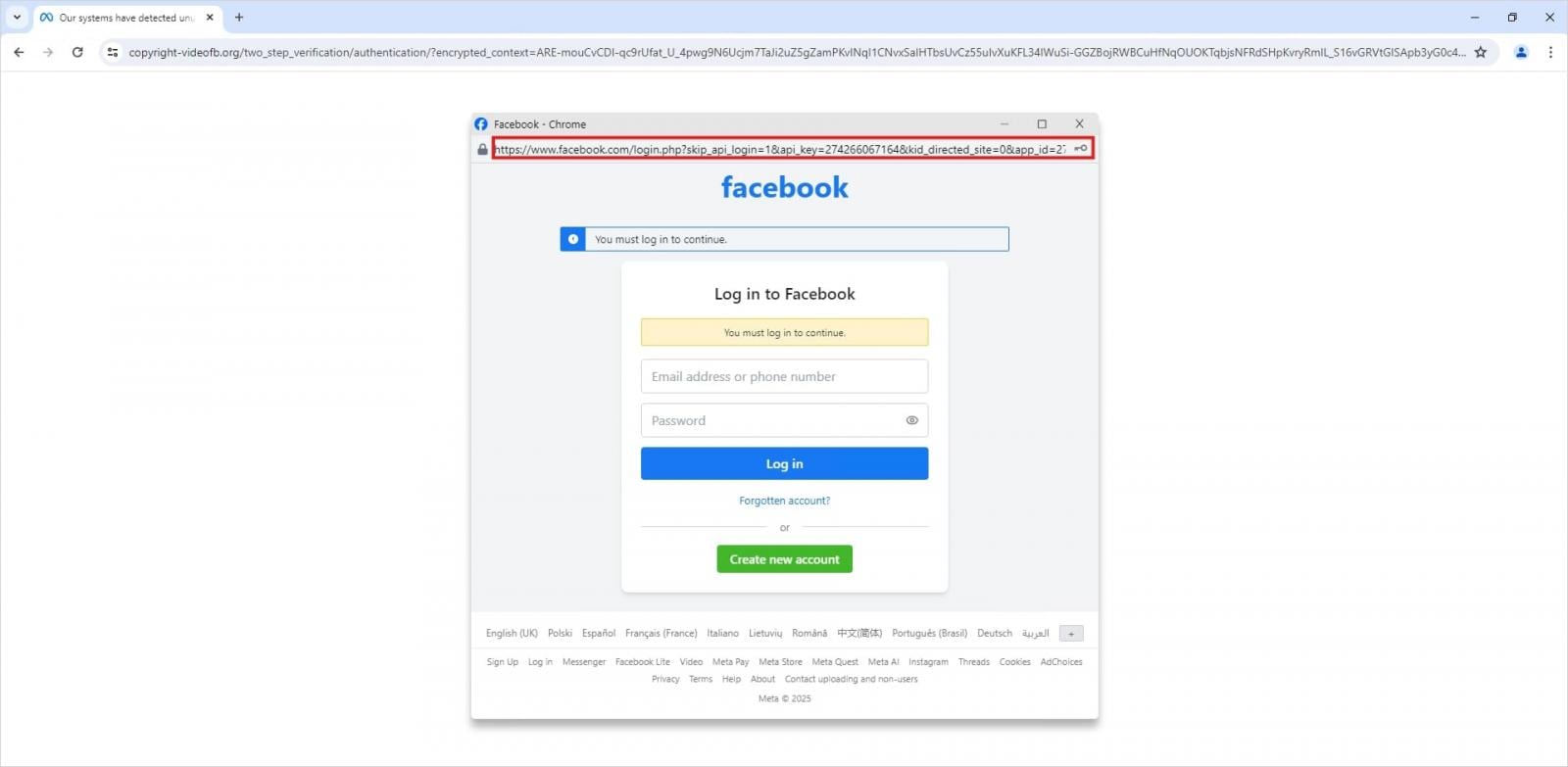
At its core, a BitB attack initiates when a user navigates to a webpage controlled by the attacker, often disguised as a legitimate entity. Upon arrival, the user is presented with what appears to be a standard browser pop-up window, containing a login form requesting credentials. Crucially, this "pop-up" is not a genuine browser window but rather a meticulously crafted iframe (an HTML document embedded inside another HTML document). This iframe is expertly designed to replicate the visual characteristics and authentication interface of legitimate platforms. Attackers can customize every aspect of this fake window, including its title bar, URL display, and even browser controls, making the deception remarkably challenging to discern from a legitimate system prompt.
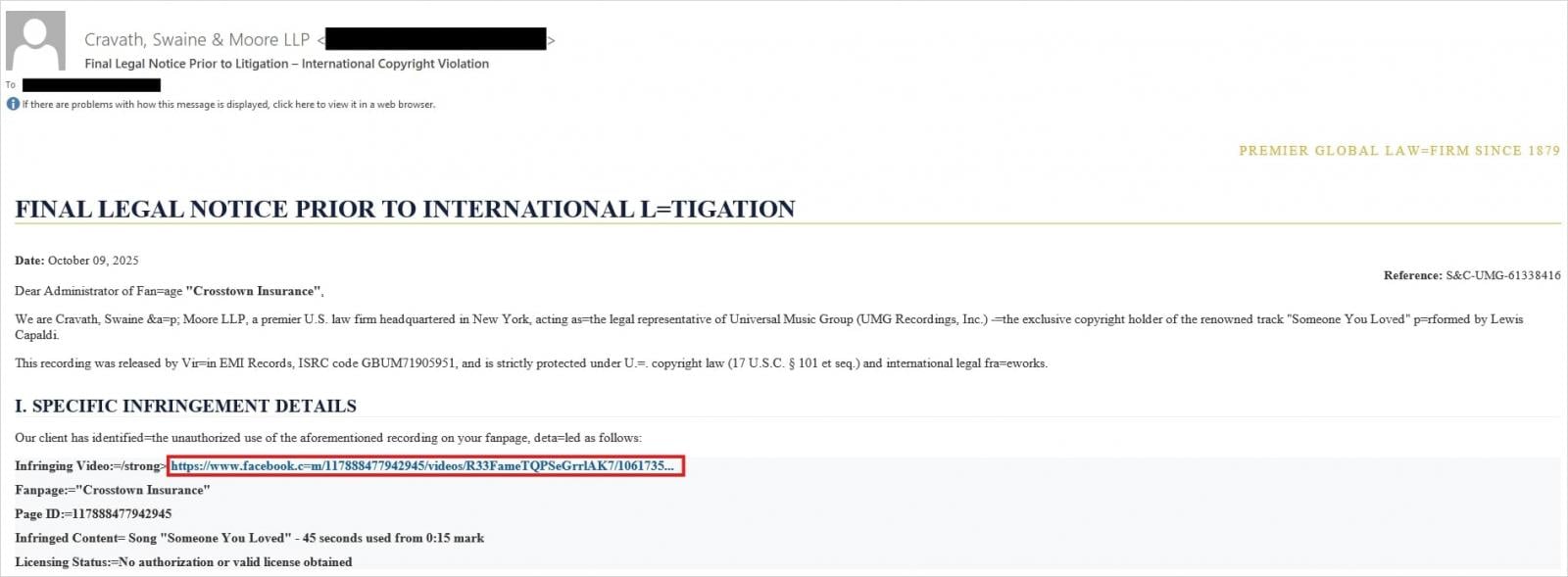
Recent phishing campaigns specifically targeting Facebook users have employed various social engineering lures to entice victims. These include fabricated notifications impersonating legal entities, such as law firms, alleging copyright infringement and threatening imminent account suspension. Other common pretexts involve seemingly authentic Meta security alerts regarding suspicious or unauthorized login attempts, designed to instill a sense of urgency and prompt immediate action from the user.
To enhance the perceived legitimacy of these attacks and evade conventional security detection mechanisms, cybercriminals are increasingly incorporating several sophisticated elements. This includes the use of URL shorteners, which obscure the true malicious destination, and the integration of fake Meta CAPTCHA pages, adding a layer of interactive authenticity before the final credential prompt. These steps are meticulously designed to build trust and bypass automated URL blacklisting and reputation-based filtering systems.

The culmination of the attack sequence involves the victim being directed to enter their Facebook credentials into the meticulously crafted, fake pop-up window. Unbeknownst to the user, this input is not transmitted to Facebook but is instead captured directly by the threat actors. The seamless integration of these fake login forms within the perceived browser environment makes it incredibly difficult for users to identify the fraudulent nature of the request.
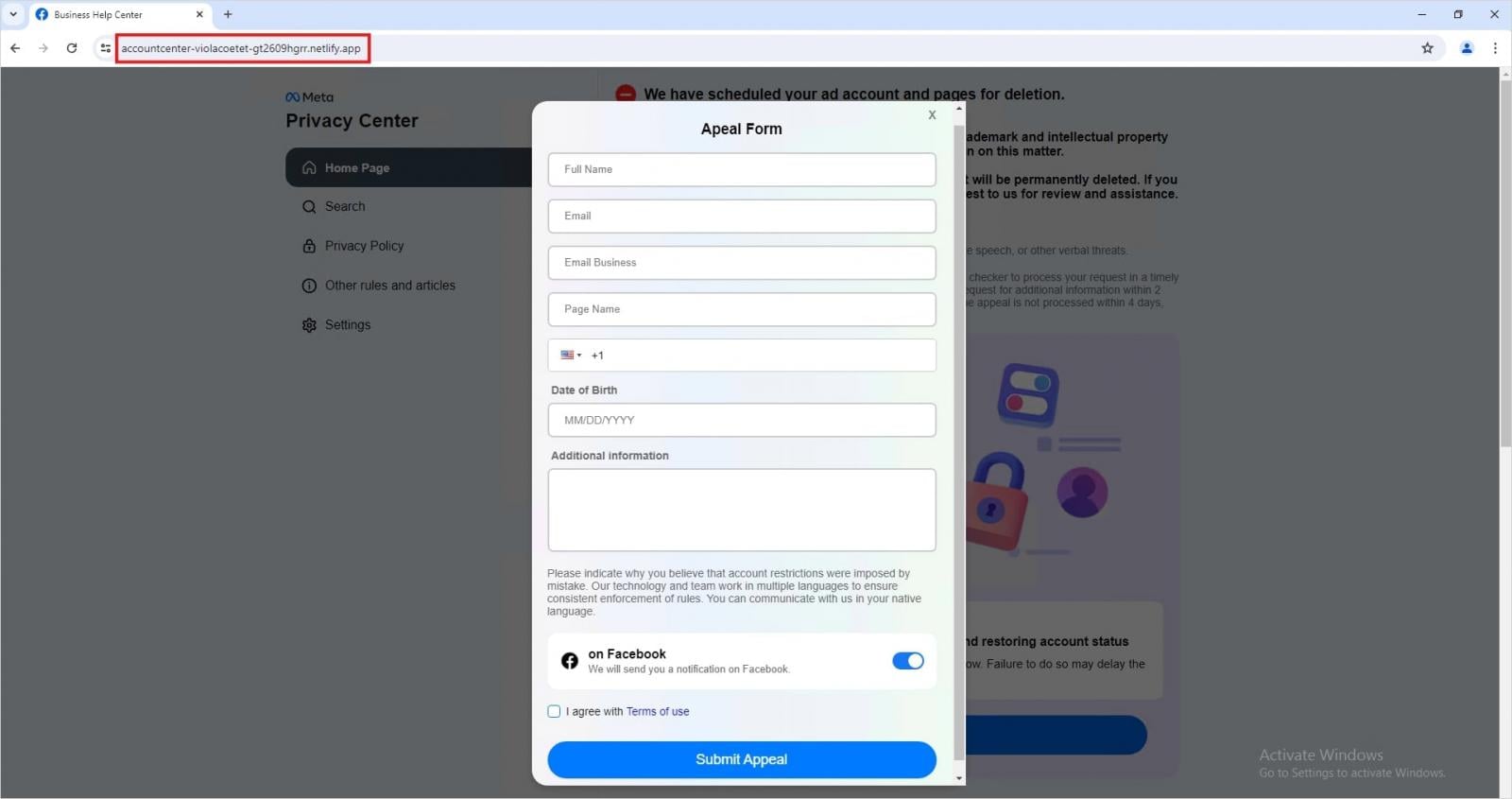
Further diversifying their tactics, Trellix researchers have also uncovered a significant volume of phishing pages hosted on legitimate cloud infrastructure platforms, such as Netlify and Vercel. These pages are designed to mimic Meta’s Privacy Center portal and typically redirect users to what appear to be appeal forms. The objective of these particular campaigns is not just credential theft but also the broader collection of personal identifiable information (PII), which can be leveraged for more extensive identity theft or targeted scam operations. The use of trusted cloud services lends an air of authenticity to these malicious sites, making them harder for users to distinguish from legitimate corporate pages and more resilient against traditional web filtering technologies.
These evolving campaigns represent a substantial escalation in the sophistication of Facebook-targeted phishing, moving beyond the simpler, more easily identifiable phishing pages of the past. The strategic abuse of trusted infrastructure, including legitimate cloud hosting services and URL shorteners, is pivotal in bypassing conventional security filters and instilling a false sense of security in potential victims. Most critically, the widespread adoption of the Browser-in-the-Browser technique marks a major inflection point in social engineering. By fabricating a custom-built, fake login pop-up window directly within the victim’s browser, this method expertly capitalizes on user familiarity with standard authentication flows, rendering the visual detection of credential theft almost impossible without specific knowledge of the attack vector.
Safeguarding Against Browser-in-Browser Deception
Protecting against advanced phishing techniques like BitB requires a combination of heightened user vigilance and robust security practices. The following recommendations are critical for individuals seeking to secure their online accounts:
1. Verify Communication Authenticity: When confronted with account-related security alerts, copyright infringement notifications, or any other urgent messages pertaining to your online accounts, always exercise extreme caution. Instead of clicking on embedded links or buttons within the email or message, independently navigate to the official website of the service (e.g., Facebook.com) by typing the URL directly into a new browser tab. This bypasses any malicious redirects that could be embedded in phishing attempts.
2. Scrutinize Login Pop-Ups: The defining characteristic of a BitB attack is its reliance on an iframe to create the fake pop-up. A genuine browser pop-up window will be an independent operating system window that can be freely moved outside the boundaries of the main browser window. In contrast, an iframe-based pop-up is intrinsically linked to the underlying webpage; it cannot be dragged or pulled outside the confines of the main browser window. Always attempt to drag any login pop-up away from the main browser window; if it cannot be moved independently, it is highly likely to be a fraudulent BitB attempt.
3. Implement Two-Factor Authentication (2FA): Activating two-factor authentication on all your online accounts, especially high-value targets like social media and email, provides a critical additional layer of security. Even if threat actors manage to compromise your primary login credentials through phishing, 2FA requires a second form of verification (e.g., a code from your mobile device or a physical security key) to gain access. While not entirely infallible against every advanced social engineering tactic (such as session hijacking or highly sophisticated real-time phishing kits), 2FA significantly raises the bar for attackers and remains an essential defense against unauthorized account access.
4. Exercise URL Vigilance: Develop a habit of carefully examining the full URL of any webpage, particularly before entering sensitive information. Look for subtle misspellings, unusual domain extensions, or subdomains that do not align with the legitimate service. Even with URL shorteners, the final destination URL might reveal discrepancies. Hovering over links (without clicking) can often reveal the underlying URL.
5. Remain Skeptical of Urgency: Phishing attacks frequently leverage a sense of urgency, threats, or enticing offers to bypass rational thought. Be wary of any communication that demands immediate action, threatens account closure, or promises improbable rewards. Legitimate organizations typically provide ample time for action and avoid aggressive, threatening language.
6. Utilize Reputable Security Software: Employing up-to-date antivirus and anti-malware software on your devices can help detect and block known malicious websites and phishing attempts. Browser extensions designed to flag suspicious URLs can also add an extra layer of protection.
7. Continuous Security Education: The landscape of cyber threats is constantly evolving. Staying informed about the latest phishing techniques and social engineering tactics is crucial. Regularly reviewing security advisories from trusted sources can empower users to recognize and avoid emerging threats.
The emergence of the Browser-in-the-Browser technique underscores a continuing trend towards more sophisticated and visually deceptive phishing methodologies. As threat actors refine their tactics, a proactive and educated approach to online security becomes paramount for protecting digital identities and personal information in an increasingly complex cyber environment.



 Lisa Mariana
 Aura Kasih
 Ayu Aulia