Safa Marwah
A leading digital vault and identity management platform has implemented a crucial new layer of defense against sophisticated phishing attempts, introducing real-time pop-up warnings designed to safeguard users from inadvertently compromising their login credentials on deceptive websites. This strategic enhancement directly addresses the evolving landscape of online threats, particularly the rise of AI-powered social engineering tactics, by providing an immediate, contextual alert mechanism at the point of potential vulnerability.
In an era defined by persistent cyber threats, robust identity management solutions like 1Password serve as foundational pillars for both individual cybersecurity and enterprise resilience. The platform, known for its subscription-based service and widespread adoption across numerous well-known organizations, continually evolves to meet emerging challenges. Its recent integration with Windows for native passkey management underscores its commitment to advancing secure authentication methods. While password managers inherently bolster security by preventing the autofill of credentials on mismatched URLs, this traditional safeguard, though vital, has proven insufficient against the increasingly clever tactics employed by threat actors. The introduction of explicit pop-up warnings represents a significant step beyond passive protection, actively engaging users when a potential phishing risk is detected.
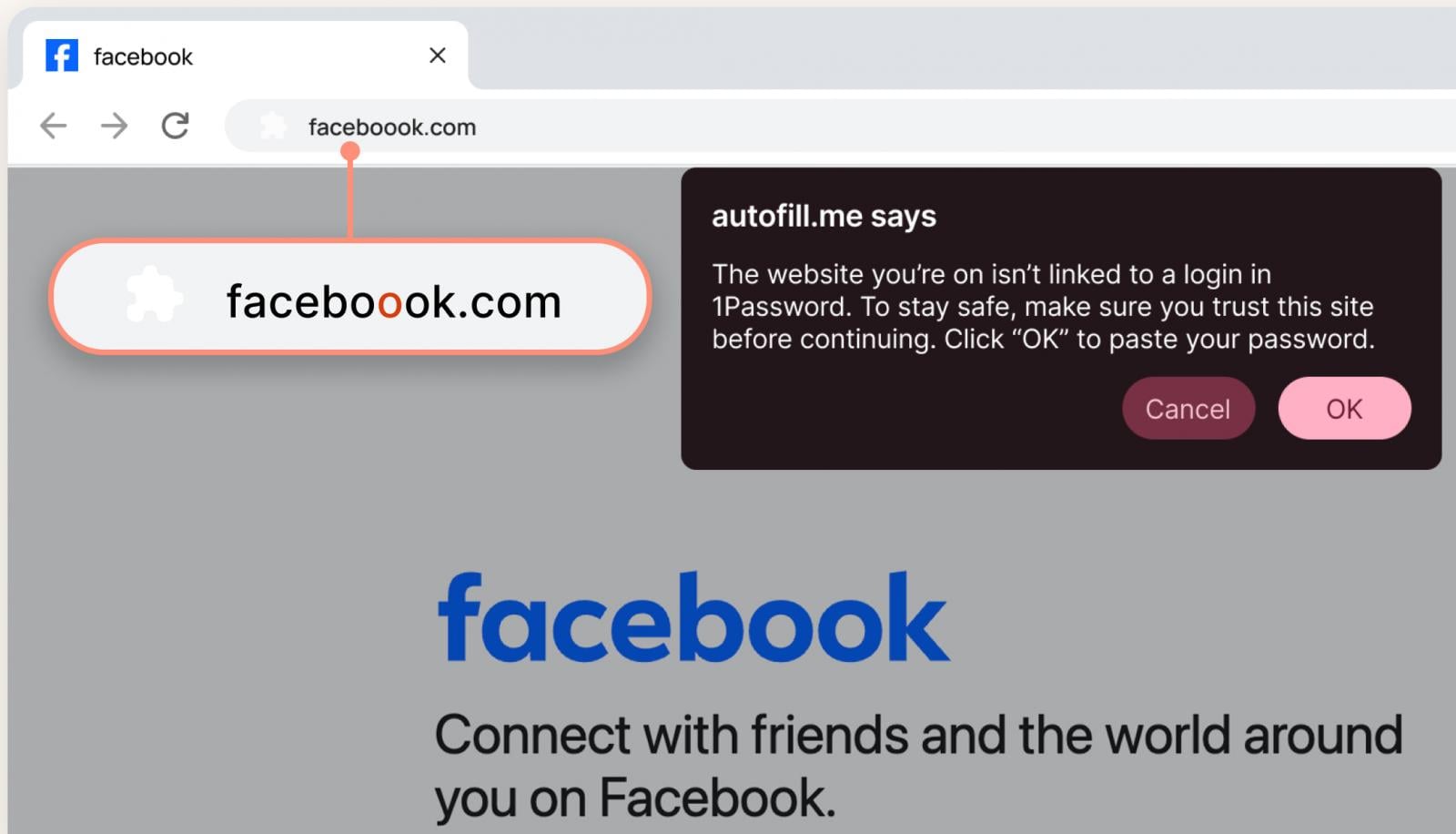
The fundamental security principle of a password manager dictates that it will only offer to autofill login data when the current website’s URL precisely matches the one stored in a user’s secure vault for that specific service. This mechanism provides a strong initial defense against credential theft, as it prevents automatic submission of sensitive information to fraudulent sites. However, the sophistication of modern phishing campaigns often exploits human psychology and common online behaviors, rendering this intrinsic protection incomplete. Threat actors frequently leverage techniques such as typosquatting, where they register domain names that are slight misspellings or visually similar to legitimate ones (e.g., "faceboook.com" instead of "facebook.com"), or homograph attacks, which use characters from different alphabets that look identical to Latin characters (e.g., using a Cyrillic ‘a’ that appears identical to a Latin ‘a’). In such scenarios, even discerning users might overlook subtle discrepancies in the URL.
The critical vulnerability arises when users, encountering a website that visually mirrors a legitimate service but whose URL subtly differs, might mistakenly attribute their password manager’s non-action to a glitch, a locked vault, or a temporary system error. Under this false assumption, they may proceed to manually enter their credentials, unwittingly handing over their access to malicious actors. This gap in security, where human perception overrides automated safeguards, represents a significant vector for credential compromise. Recognizing this nuanced challenge, 1Password has introduced an additional, proactive layer of protection: an interactive pop-up warning that explicitly alerts users to potential phishing risks when they land on a suspected deceptive domain.
This new functionality is designed to act as a crucial "speed bump" in the user’s workflow, prompting them to pause, re-evaluate the URL, and consciously confirm the legitimacy of the site before attempting any manual credential entry. As elaborated by the vendor, the pop-up serves as a direct reminder to "slow down and look more closely before proceeding," particularly in scenarios where a subtle alteration, like an extra character in a familiar domain, might otherwise go unnoticed. This direct intervention aims to break the cognitive biases and habitual behaviors that often lead to successful phishing attacks, transforming a passive security feature into an active educational tool.
The deployment of this enhanced security feature is structured to maximize its impact across diverse user bases. For individual users and those on family plans, the pop-up warning system is automatically enabled, democratizing advanced phishing protection without requiring manual configuration. This ensures a broad application of the safeguard where it is most often needed. For enterprise clients, administrators retain the flexibility to activate this feature for their employees through the Authentication Policies within the 1Password admin console. This administrative control allows organizations to integrate the pop-up warnings into their existing security policies and training programs, reinforcing a holistic approach to corporate cybersecurity.

The urgency for such enhanced protections is underscored by the escalating threat landscape, significantly exacerbated by the proliferation of artificial intelligence tools. AI’s capabilities have profoundly transformed the scale and sophistication of phishing attacks. Attackers can now leverage AI to:
- Generate High-Volume, Personalized Content: AI models can craft millions of unique, grammatically flawless, and contextually relevant phishing emails, messages, and website content, making them far more convincing and harder to detect by traditional filters.
- Enhance Social Engineering: AI-driven analysis of public data can enable attackers to create highly personalized narratives that exploit specific psychological vulnerabilities, emotional triggers, or organizational contexts, leading to more effective social engineering campaigns.
- Automate Attack Infrastructure: AI can aid in the rapid deployment of phishing sites, domain generation, and even the real-time adaptation of attack vectors based on user interactions.
- Deepfake Technology: Advanced AI allows for the creation of realistic deepfake audio and video, raising the specter of "vishing" (voice phishing) and "smishing" (SMS phishing) attacks that impersonate executives or trusted contacts with unprecedented authenticity.
In this environment, where the line between legitimate and malicious content becomes increasingly blurred, relying solely on user vigilance is an untenable strategy. The new 1Password feature is a direct countermeasure to this AI-supercharged threat, providing a human-centric defense mechanism against machine-generated deception.
Industry research consistently highlights the pervasive vulnerability of users to phishing. A comprehensive survey of 2,000 individuals in the U.S. revealed alarming statistics: a staggering 61% of respondents admitted to having been successfully phished, indicating a widespread susceptibility to these attacks. Further reinforcing the need for proactive warnings, 75% of participants confessed that they do not routinely inspect URLs before clicking on links, a behavior that directly exposes them to malicious sites. This widespread lack of URL scrutiny creates a fertile ground for typosquatting and other deceptive domain tactics to thrive. The survey findings underscore a critical disconnect between the perceived threat and actual user behavior, making automated, context-sensitive alerts an indispensable component of modern security.
The implications for corporate environments are particularly profound, given the potential for a single compromised credential to lead to catastrophic breaches. The survey data painted a grim picture for organizational security:
- Password Reuse: A significant one-third of employees admitted to reusing passwords across work accounts, a practice that drastically amplifies the risk of lateral movement within a network once a single credential is stolen via phishing.
- High Phishing Victimization: Nearly half of corporate employees reported falling victim to phishing attacks, highlighting the persistent effectiveness of these schemes despite organizational security measures.
- Misplaced Responsibility: Almost 50% of survey participants believed that phishing protection was solely the responsibility of the IT department, not their own. This perception of security as an IT-exclusive concern often leads to user complacency and reduced vigilance.
- Risky Click Behavior: A concerning 72% of employees acknowledged clicking suspicious links, demonstrating a pervasive tendency towards risky online behavior within the workplace.
- Reporting Apathy: More than 50% of respondents found it more convenient to simply delete suspicious messages rather than report them to IT. This lack of reporting deprives security teams of valuable threat intelligence and hinders their ability to proactively block new attack vectors.
These statistics collectively illustrate a challenging security landscape where human factors, organizational culture, and technical safeguards must work in concert. The new 1Password pop-up directly addresses several of these enterprise-level vulnerabilities. By providing an immediate, undeniable alert, it empowers employees to become a more effective "human firewall," mitigating the risks associated with complacency, lack of URL checking, and the potentially devastating consequences of credential compromise and subsequent lateral movement. It shifts the dynamic from a reactive response to a proactive intervention, offering a critical safety net even when user vigilance falters.
Looking ahead, the evolution of phishing attacks, propelled by advancements in AI and social engineering, will necessitate continuous innovation in defensive strategies. While tools like 1Password’s new pop-up warnings offer a vital layer of protection, the arms race between attackers and defenders is perpetual. Future developments may include more sophisticated contextual analysis, integration with real-time threat intelligence feeds to identify emerging phishing campaigns even faster, and potentially adaptive warning systems that learn from user interactions and threat patterns. The emphasis will increasingly be on creating a seamless, yet robust, security experience that guides users away from danger without impeding productivity. Ultimately, technological safeguards, however advanced, must be complemented by ongoing user education and a culture of shared responsibility for cybersecurity. The proactive alerting mechanism from 1Password represents a significant stride in this ongoing effort, embedding critical security awareness directly into the user workflow and fortifying the weakest link in the security chain: the human element.




 Lisa Mariana
 Aura Kasih
 Ayu Aulia