Safa Marwah
Microsoft is actively engaged in addressing a series of vexing issues that are currently disrupting email synchronization and connection functionalities for users relying on the traditional Outlook desktop application. These ongoing technical complications underscore the inherent complexities of maintaining legacy software within a rapidly evolving digital ecosystem, impacting critical business processes and daily communication for a significant segment of its user base.
The classic Outlook client, a stalwart of enterprise and individual productivity for decades, continues to hold a prominent position despite Microsoft’s push towards its newer, web-centric "Outlook for Windows" experience. Millions of users, often anchored by deeply ingrained workflows, specific add-ins, or organizational policies, remain reliant on the established desktop application. However, this reliance is increasingly challenged by a succession of technical glitches that manifest as critical disruptions, ranging from failures in collaborative group creation to difficulties synchronizing popular third-party email accounts and even fundamental user interface anomalies. The current investigations by Microsoft’s engineering teams highlight the intricate challenges involved in ensuring seamless operation across diverse backend services and evolving security protocols.
One prominent issue under scrutiny involves difficulties encountered when users attempt to create groups within the classic Outlook environment. Specifically, users are reporting "Can’t connect to the server" error messages, a problem that appears to be triggered when Exchange Web Services (EWS) is enabled for the tenant. The technical root cause, as identified by Microsoft, lies within a failed AD Graph call – specifically, the ValidateUnifiedGroupProperties function – which returns an internal server error indicating that "Both AAD and MSGraph clients are null or AAD Graph is disabled for this API." This detailed error message points to a fundamental communication breakdown between the Outlook client and Microsoft’s directory services.

This particular bug is indicative of a broader strategic shift within Microsoft’s development paradigm. The AD Graph API, a precursor to the more modern and robust Microsoft Graph API, is gradually being deprecated. Legacy applications that still rely on AD Graph are increasingly encountering compatibility issues as underlying services evolve. Microsoft’s acknowledgement that the Outlook Team is actively working to transition group functionality to utilize REST APIs, which are the foundational elements of Microsoft Graph, confirms this architectural pivot. The move to REST APIs is designed to enhance scalability, security, and integration capabilities, offering a more resilient framework for future development. Until this significant architectural update is fully implemented and rolled out, organizations and individual users grappling with this group creation impediment are being advised to bypass the classic client for this specific task. The recommended temporary solution involves leveraging the "new Outlook" client or accessing Outlook Web Access (OWA) to create and edit groups, thereby circumventing the legacy API dependencies. This workaround, while functional, imposes an additional layer of friction for users accustomed to a unified experience within their primary desktop application, potentially impacting productivity in collaborative environments.
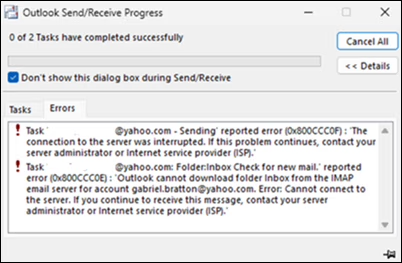
Beyond the challenges of internal Exchange functionalities, classic Outlook is also experiencing significant hurdles in its interaction with external email providers. A separate, critical issue is manifesting as synchronization errors, specifically 0x800CCC0F and 0x80070057, when users attempt to synchronize their Gmail and Yahoo accounts. These error codes are commonly associated with general connectivity or timeout issues, often indicating a failure in establishing a secure and stable connection to the mail server or an inability to complete the data transfer process. Microsoft’s investigation reveals that a primary trigger for these errors occurs after users change their Gmail or Yahoo account passwords within classic Outlook, without the client subsequently prompting for re-authentication. This suggests a failure in the client’s credential management system to adequately recognize or refresh authentication tokens following a password update. The system appears to be attempting to use outdated credentials, leading to repeated authentication failures and, consequently, sync errors. Microsoft also acknowledges that other undisclosed circumstances might lead to the same issue, indicating a potentially broader underlying problem with third-party account integration.
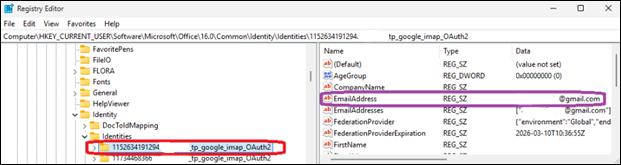
The implications of such synchronization failures are substantial. For many users, particularly those managing personal and professional communications through a single client, the inability to reliably sync Gmail or Yahoo accounts can lead to missed emails, delayed responses, and a significant disruption to daily operations. The workaround proposed by Microsoft for this particular issue is notably more technical and carries a higher degree of user responsibility. Affected customers are instructed to manually delete specific registry entries associated with the problematic email addresses. This involves navigating to ComputerHKEY_CURRENT_USERSoftwareMicrosoftOffice16.0CommonIdentityIdentities in the Windows Registry Editor and removing the relevant entries. While this method can resolve the immediate symptom by forcing Outlook to re-establish identity configurations, it is a procedure typically reserved for advanced users or IT professionals. Requiring end-users to modify the Windows Registry introduces potential risks if not performed meticulously, underscoring the severity and lack of a more user-friendly, automated solution at present. The fact that such a manual, low-level intervention is necessary highlights the depth of the integration challenge for legacy clients dealing with modern authentication mechanisms like OAuth, which are increasingly employed by major email providers.
Adding to the list of current disruptions, Microsoft has also acknowledged a perplexing user interface bug within classic Outlook that causes the mouse pointer to inexplicably disappear. This issue, which surfaced in user reports nearly two months prior to official acknowledgement, is not confined solely to Outlook but also impacts certain users of OneNote and other applications within the Microsoft 365 suite. A disappearing cursor is a profoundly disruptive user experience flaw, hindering fundamental interaction with the application and severely impacting productivity. It transforms basic navigation and data entry into a frustrating ordeal, forcing users to guess cursor positions or resort to keyboard shortcuts.
The cross-application nature of this mouse pointer issue suggests a more systemic problem, potentially residing in a shared UI component, graphics rendering engine, or an interaction with underlying operating system elements or display drivers. Microsoft’s request for affected customers to open support cases via their Microsoft 365 administrators and submit diagnostic log files is a critical step in isolating the root cause of such a complex, intermittent bug. Detailed log data can provide invaluable insights into the sequence of events leading to the cursor’s disappearance, helping engineers pinpoint memory leaks, rendering conflicts, or other software anomalies. In the interim, the suggested workarounds are indicative of the bug’s elusive nature: clicking an email in the message list, switching to PowerPoint and interacting with an editable area before returning to Outlook, or ultimately, restarting the entire computer. These are symptomatic fixes rather than true resolutions, offering temporary relief but not addressing the underlying fault, further underscoring the ongoing challenge in diagnosing and rectifying deep-seated software glitches in legacy applications.
These current investigations are not isolated incidents but rather part of a continuous pattern of maintenance and remediation efforts for the classic Outlook client. As recently as January, Microsoft released a fix for another significant issue stemming from December 2025 updates, which had prevented Microsoft 365 customers from opening encrypted emails. This recurring need for critical patches underscores the inherent difficulties in sustaining complex, feature-rich legacy software in an environment where operating systems, security protocols, and backend services are constantly evolving. Each update to Windows, Exchange Online, or external email provider APIs introduces new potential points of failure for older client applications that were not originally designed with these future changes in mind.
The broader implications of these ongoing issues extend beyond mere inconvenience. For organizations heavily invested in the Microsoft ecosystem, these disruptions can translate into significant productivity losses, increased IT support overhead, and potential security vulnerabilities if users resort to less secure workarounds. The necessity of manual registry edits, for instance, highlights a gap in user-friendly troubleshooting and places an undue burden on end-users or IT departments. Moreover, such persistent issues can erode user confidence in the stability and reliability of core productivity tools, potentially prompting organizations to re-evaluate their client strategies or accelerate transitions to newer platforms.
Microsoft’s long-term strategy clearly involves migrating users to the "new Outlook" experience, which is built on a modern architecture and designed for better integration with cloud services. However, the transition for enterprise clients is often slow and complex, necessitating continued support and maintenance for the classic client for the foreseeable future. The current spate of bugs serves as a stark reminder of the technical debt accumulated by legacy applications and the intricate balancing act Microsoft must perform between innovating with new products and responsibly supporting its established user base. As Microsoft diligently works to identify root causes and deploy comprehensive fixes, the ongoing challenges underscore the critical importance of robust software maintenance and the continuous adaptation required to keep foundational productivity tools functioning seamlessly in an ever-changing technological landscape. The resolution of these issues will be crucial in ensuring that the classic Outlook client continues to serve its dedicated user base effectively, even as the company charts a course towards its next generation of communication platforms.



 Lisa Mariana
 Ayu Aulia
 Ridwan Kamil
 Aura Kasih