
 Safa Marwah
Recent Windows 11 Insider Preview builds from Microsoft introduce significant advancements designed to bolster the security and optimize the operational efficiency of batch file and Command Prompt script execution within the operating system, alongside substantial improvements to the shared audio experience. These updates underscore Microsoft’s commitment to evolving Windows 11 into a more robust and user-friendly platform for both enterprise environments and individual consumers.
The Critical Role and Inherent Vulnerabilities of Scripted Workflows in Enterprise Computing
Batch files and Command Prompt (CMD) scripts, despite their origins in earlier computing paradigms, remain indispensable tools in modern enterprise environments. System administrators, IT professionals, and developers heavily rely on these scripts for a multitude of tasks, including automating routine maintenance, deploying software updates, configuring system settings, managing user accounts, and orchestrating complex multi-step processes. Their simplicity, direct integration with the operating system, and universal compatibility across various Windows versions make them a go-to solution for command-line automation.
However, this widespread utility also exposes a significant attack surface. The traditional execution model for batch files has presented an inherent vulnerability: the potential for scripts to be modified during their execution. In a conventional scenario, a batch file is processed line by line. An attacker who gains even limited access to a system, or who can exploit other vulnerabilities, might be able to inject malicious commands, alter existing commands, or replace the script file itself after its initial validation but before subsequent commands are processed. This "race condition" or "time-of-check-to-time-of-use" (TOCTOU) vulnerability can lead to unauthorized code execution, privilege escalation, data exfiltration, or system compromise. Such exploits are particularly dangerous in environments where scripts run with elevated privileges or handle sensitive data.
The integrity of these automated workflows is paramount for maintaining system stability, data security, and operational continuity. Enterprises invest heavily in security measures to protect their networks and endpoints, yet a fundamental vulnerability within the script execution mechanism itself can undermine these efforts. Therefore, addressing this specific attack vector is a crucial step in hardening the Windows operating system against sophisticated and persistent threats.
Microsoft’s Strategic Intervention: Securing Batch File Integrity During Execution
Microsoft’s latest enhancements directly target this critical vulnerability by introducing mechanisms to prevent batch files from being altered once their execution has commenced. This is a foundational security improvement that significantly elevates the trustworthiness of automated scripts.

The core of this new functionality revolves around two key controls:
LockBatchFilesInUseRegistry Value: IT administrators can activate a more secure processing mode by adding this specific registry value underHKEY_LOCAL_MACHINESoftwareMicrosoftCommand Processor. This centralized configuration allows system-wide enforcement of the new security posture for batch file execution. When enabled, the operating system effectively locks the batch file in memory or prevents any modifications to its disk counterpart for the duration of its execution. This ensures that every command processed by the script is precisely what was present at the initiation of the script, eliminating the window of opportunity for runtime tampering.LockBatchFilesWhenInUseApplication Manifest Control: For policy authors and developers creating applications that execute batch files, this application manifest control offers a more granular, application-specific method to invoke the secure processing mode. By embedding this control within an application’s manifest, developers can ensure that any batch files launched by their application adhere to the stricter security protocol, irrespective of the system-wide registry setting. This provides flexibility and allows specific applications to demand higher integrity for their associated scripts.
This strategic update offers dual benefits: enhanced security and improved performance. From a security standpoint, preventing modifications during execution closes a critical attack vector that could be exploited by malicious actors to inject or alter commands. This ensures that the integrity of the script is maintained throughout its lifecycle, significantly reducing the risk of unauthorized actions.
From a performance perspective, this feature synergizes powerfully with code integrity mechanisms. In environments where code integrity is enabled – a security feature that verifies the cryptographic signatures of binaries and scripts before allowing them to run – the new secure processing mode allows for signature validation to occur only once, at the very beginning of the batch file’s execution. Previously, without this lock, a system enforcing code integrity might have needed to re-validate the script’s signature or individual statements multiple times during execution to ensure no tampering had occurred. By locking the file in use, the system can confidently perform a single, initial validation, thereby reducing computational overhead and accelerating script execution. This is particularly beneficial for lengthy or resource-intensive batch processes, translating directly into faster and more efficient automated workflows.
Broader Implications for Enterprise Security and Management
The introduction of these controls represents a significant step forward in Microsoft’s ongoing efforts to harden the Windows operating system against increasingly sophisticated cyber threats. For enterprises, the implications are substantial:
- Reduced Attack Surface: By eliminating the possibility of runtime modification, a critical avenue for script-based attacks is closed, making it harder for attackers to compromise systems through legitimate automation tools.
- Enhanced Integrity for Automated Workflows: IT administrators can now have greater confidence in the integrity of their automated scripts, knowing that they will execute exactly as intended without external interference. This is crucial for maintaining system health, compliance, and data security.
- Streamlined Compliance and Auditing: Organizations operating under stringent regulatory frameworks can leverage this feature to demonstrate a higher level of control over script execution, simplifying compliance efforts and providing clearer audit trails.
- Empowering IT Professionals: The new controls provide IT administrators and security architects with powerful, yet flexible, tools to tailor their security posture to specific organizational needs and risk profiles. The choice between a system-wide registry setting and an application-specific manifest control offers versatility in deployment.
- Performance Optimization: The synergy with code integrity not only enhances security but also delivers tangible performance improvements, which can lead to more efficient operations and reduced resource consumption in environments heavily reliant on script automation.
Implementing these new controls will require careful planning by IT departments, especially in large-scale deployments. Administrators will need to evaluate existing script dependencies and ensure compatibility, although the feature is designed to enhance, not disrupt, current practices. The benefits, however, far outweigh the implementation considerations, positioning Windows 11 as an even more secure platform for critical enterprise operations.
Advancing User Experience: The Evolution of Shared Audio in Windows 11
Beyond the significant security enhancements for batch file execution, the latest Windows 11 Insider builds also bring substantial improvements to the Shared Audio feature, initially introduced in October. This feature, built upon the capabilities of Bluetooth LE Audio, allows users to share audio output from their Windows device simultaneously across two compatible headphones, speakers, earbuds, or hearing aids. This is particularly useful for collaborative listening, watching media with a friend, or for individuals requiring separate audio streams for accessibility reasons.

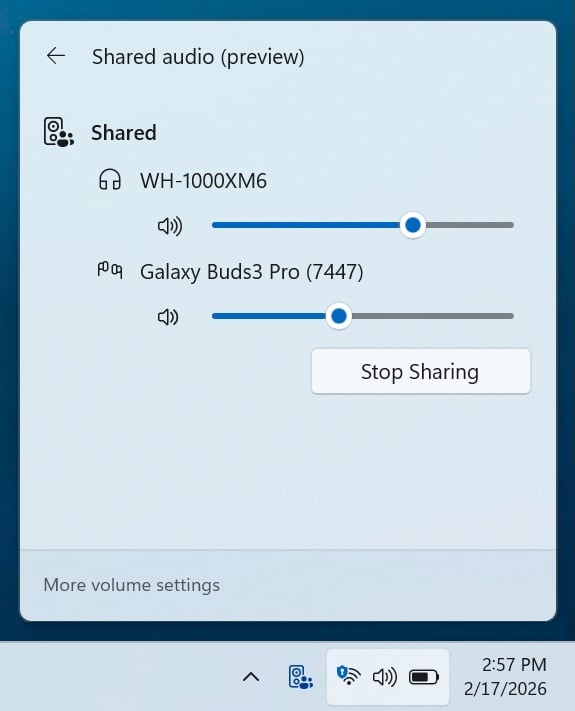
The initial rollout of Shared Audio was a promising step, but it came with certain limitations, primarily concerning volume control. Previously, adjusting the volume for one listener or device would equally affect the other, which could lead to an imbalanced audio experience if two users had different preferences or hearing sensitivities. The new update directly addresses this by introducing individual volume sliders for each connected listener and device. This granular control allows users to independently adjust their audio levels, providing a more personalized and comfortable listening experience for both parties.
Furthermore, Microsoft has enhanced the usability and accessibility of the Shared Audio feature with a new taskbar indicator. This visual cue appears prominently during active sharing sessions, serving as a clear reminder that audio is being shared. More importantly, this indicator also functions as a one-click shortcut, providing immediate access to the sharing settings. This streamlines the user experience, making it easier to manage shared audio sessions without navigating through multiple menus.
The expansion of compatible devices is another critical development. The feature now supports a broader range of Bluetooth LE Audio accessories, including the Samsung Galaxy Buds 4 and Buds 4 Pro, Sony WF-1000XM6, and the Xbox Wireless Headset. This expansion is crucial for broader user adoption and ensures that more individuals can take advantage of the shared audio functionality with their existing or preferred audio hardware. The inclusion of the Xbox Wireless Headset, in particular, highlights Microsoft’s efforts to integrate its ecosystem seamlessly, offering enhanced utility for gamers and multimedia enthusiasts alike.
These audio enhancements underscore Microsoft’s commitment to delivering a rich and versatile multimedia experience on Windows 11. As wireless audio technology, particularly Bluetooth LE Audio, continues to evolve, features like Shared Audio will become increasingly important for modern users who expect flexible and high-quality audio solutions.
The Windows Insider Program: A Catalyst for Continuous Innovation
Both the batch file security improvements and the Shared Audio enhancements are currently rolling out to Windows Insiders in the Dev and Beta channels. Specifically, these capabilities are available to those who have installed Windows 11 Preview Build 26220.7934 (KB5077242) in the Beta Channel and Windows 11 Preview Build 26300.7939 (KB5077243) in the Dev Channel.
The Windows Insider Program plays a pivotal role in Microsoft’s iterative development process. It serves as a vital feedback loop, allowing Microsoft to test new features, gather user insights, and refine functionalities before their broader public release. Insiders, comprising a global community of enthusiasts, developers, and IT professionals, provide invaluable data on stability, performance, and usability in real-world scenarios. This phased rollout approach ensures that features are thoroughly vetted, potential issues are identified and addressed, and the final product delivered to general availability users is robust and polished. This collaborative model is a cornerstone of Microsoft’s strategy for continuously evolving Windows 11 to meet the dynamic needs of its diverse user base.
Broader Strategic Context and Future Outlook
These recent updates are indicative of Microsoft’s holistic approach to operating system development. On one hand, the batch file security improvements reflect a deep understanding of enterprise security requirements and the ongoing battle against sophisticated cyber threats. By addressing fundamental vulnerabilities in core operating system components, Microsoft is enhancing the foundational security posture of Windows 11, making it a more resilient platform for critical business operations. This aligns with a broader industry trend towards "security by design," where security considerations are integrated from the earliest stages of feature development.
On the other hand, the advancements in Shared Audio demonstrate a commitment to enhancing the user experience, particularly in the realm of multimedia and accessibility. As hybrid work models and digital entertainment consumption continue to grow, the demand for flexible, high-quality audio solutions becomes paramount. By refining features like Shared Audio and expanding device compatibility, Microsoft is ensuring that Windows 11 remains at the forefront of user-centric innovation.
The ongoing evolution of Windows 11, as demonstrated by these Insider Preview builds, underscores a continuous effort to balance robust security with cutting-edge performance and an intuitive user experience. As the digital landscape continues to shift, these iterative improvements are essential for maintaining Windows’ position as a leading operating system for both professional and personal use, adapting to new challenges and opportunities presented by emerging technologies and evolving user expectations. The insights gleaned from the Insider Program will undoubtedly shape the future trajectory of these features, ensuring they are refined to meet the highest standards before their wider release.




 Ridwan Kamil
 Aura Kasih


 Lisa Mariana