Safa Marwah
The latest optional cumulative update for Windows 11 introduces a comprehensive suite of enhancements designed to bolster system security, streamline diagnostic capabilities, and refine overall user experience. This release encompasses crucial improvements to BitLocker encryption, the integration of an advanced system monitoring utility, and a new native network speed test tool, alongside various performance optimizations and foundational infrastructure updates, signaling a continuous evolution of the operating system’s core functionalities.
Microsoft’s strategic approach to Windows updates involves a multi-tiered release schedule, distinguishing between mandatory security patches and optional preview updates. This particular release, identified as KB5077241, falls into the latter category. Issued towards the end of the month, these preview updates serve as a vital conduit for delivering quality-of-life improvements, new features, and bug fixes ahead of the subsequent month’s mandatory Patch Tuesday rollout. This allows system administrators and power users an opportunity to evaluate changes in a controlled environment, ensuring stability and compatibility before widespread deployment. Unlike their security-focused counterparts, these optional packages concentrate solely on qualitative enhancements, providing a glimpse into the operating system’s ongoing refinement without addressing immediate security vulnerabilities.
A cornerstone of this February 2026 optional update is the significant enhancement to BitLocker, Microsoft’s full-disk encryption solution. BitLocker is a critical component for data protection, especially in environments where device theft or unauthorized access poses a substantial risk. Its primary function is to encrypt entire volumes, making data inaccessible without the correct decryption key. Previous iterations sometimes presented challenges, notably device freezes occurring after the entry of a recovery key—a scenario that could be particularly disruptive during system restoration or troubleshooting. The current update specifically addresses and rectifies these reliability issues, ensuring a smoother and more dependable recovery process. For organizations and individual users alike, this translates to heightened confidence in their data security infrastructure and reduced operational friction when engaging with BitLocker-protected systems. The integrity of the recovery process is paramount, as a failure at this stage can render data irretrievable or cause significant downtime. This fix underscores Microsoft’s commitment to fortifying the foundational security mechanisms within Windows 11, improving not just the security posture but also the usability and manageability of encrypted endpoints.
Beyond encryption, the update introduces a new, natively integrated network speed test utility, a feature designed to enhance user convenience and simplify basic network diagnostics. In an era where connectivity is fundamental to nearly every computing task, the ability to quickly assess network performance is invaluable. Previously, users often relied on third-party websites or applications to measure their internet speeds. The integration of this tool directly into the Windows taskbar, accessible via the Wi-Fi or Cellular Quick Settings panel or through a right-click on the system tray’s network icon, streamlines this process significantly. It provides immediate feedback on connection speeds across Ethernet, Wi-Fi, and cellular interfaces. This enhancement not only empowers users to self-diagnose common connectivity issues but also reduces the necessity for external tools, contributing to a more self-sufficient and integrated user experience. For IT support, this feature can also serve as a quick first-line diagnostic, helping to differentiate between local network issues and broader internet service provider problems, thereby accelerating troubleshooting efforts.
Perhaps one of the most significant additions for system administrators and security professionals is the introduction of native System Monitor (Sysmon) functionality. Sysmon, a component of the renowned Sysinternals suite, is an advanced monitoring tool that provides detailed information about processes, network connections, and file system activity. Historically, its deployment required a separate download and installation, often involving manual configuration for optimal use. By embedding Sysmon natively within Windows 11, albeit disabled by default, Microsoft is providing a powerful forensic and security monitoring capability directly within the operating system. This integration simplifies deployment and management for organizations looking to gain deeper insights into system behavior, detect anomalous activities, and bolster their endpoint detection and response (EDR) strategies. The fact that it’s disabled by default offers administrators granular control over its activation and configuration, allowing them to tailor its extensive logging capabilities to their specific security requirements and resource considerations. This move aligns with a broader industry trend towards embedding more robust security tools directly into operating systems, reducing reliance on third-party agents for fundamental monitoring tasks. The long-term implications include potentially richer telemetry for threat hunting, improved incident response capabilities, and a more integrated security ecosystem within Windows.

Further enhancing system resilience, the update automatically enables Quick Machine Recovery (QMR) on Windows Professional devices that are not domain-joined and are not enrolled in enterprise endpoint management solutions. This targeted activation underscores Microsoft’s understanding of the diverse needs of its user base. For small businesses, independent professionals, or home users running Windows Professional, QMR offers a simplified and efficient method for system restoration, minimizing downtime and data loss in the event of critical system failures. Unlike complex enterprise-grade recovery solutions, QMR is designed for straightforward use, making advanced system recovery accessible without requiring specialized IT expertise or extensive infrastructure. This proactive enablement helps ensure that a significant segment of Windows users benefits from enhanced system stability and quicker recovery times, contributing to a more reliable computing experience overall.
The February 2026 update also brings several performance and user experience refinements. Improvements to the reliability of PCs waking from sleep states, coupled with a reduction in the time required for a system to resume, particularly under heavy load, address common user frustrations. The "instant-on" experience is a highly valued aspect of modern computing, and these optimizations contribute significantly to perceived system responsiveness and overall productivity. Furthermore, a seemingly minor but impactful quality-of-life enhancement allows users to open a new File Explorer instance by holding down the Shift key or using the middle mouse button. Such small usability tweaks, while not revolutionary, collectively contribute to a more fluid and efficient user workflow, catering to advanced users who prioritize quick navigation and multitasking.
Alongside these direct enhancements, the update continues the gradual rollout of previously announced features. The redesigned Start menu, initially introduced with the October 2025 non-security update (KB5067036), is steadily becoming available to a wider array of Windows devices. This phased deployment strategy allows Microsoft to gather telemetry, monitor performance, and address any unforeseen issues before a full-scale release, ensuring a smoother transition for the user base. Similarly, updated battery icons, also a part of the October 2025 rollout, continue to propagate across Windows devices, offering users a clearer and more intuitive visual representation of their device’s power status. These incremental UI/UX changes reflect Microsoft’s ongoing efforts to modernize the Windows 11 interface and improve its aesthetic and functional appeal.
Crucially, this update also plays a role in a vital security infrastructure refresh: the deployment of updated Secure Boot certificates. Secure Boot is a security standard developed by members of the PC industry to help ensure that a device boots using only software that is trusted by the Original Equipment Manufacturer (OEM). It is a critical defense mechanism against bootkit malware and ensures the integrity of the boot process. The original Secure Boot certificates, issued in 2011, are scheduled to expire in late June 2026. Microsoft proactively announced its plans to refresh these certificates in January, following an earlier alert in November warning administrators about the impending expiration. The inclusion of these updated certificates within the KB5077241 package is a testament to Microsoft’s commitment to maintaining the long-term security and trustworthiness of the Windows ecosystem. Failure to update these certificates could lead to boot failures on affected systems or expose them to significant security vulnerabilities by compromising the chain of trust from the firmware level upwards. This proactive measure ensures that Windows 11 devices continue to operate within a robust and secure boot environment, safeguarding against sophisticated low-level threats.
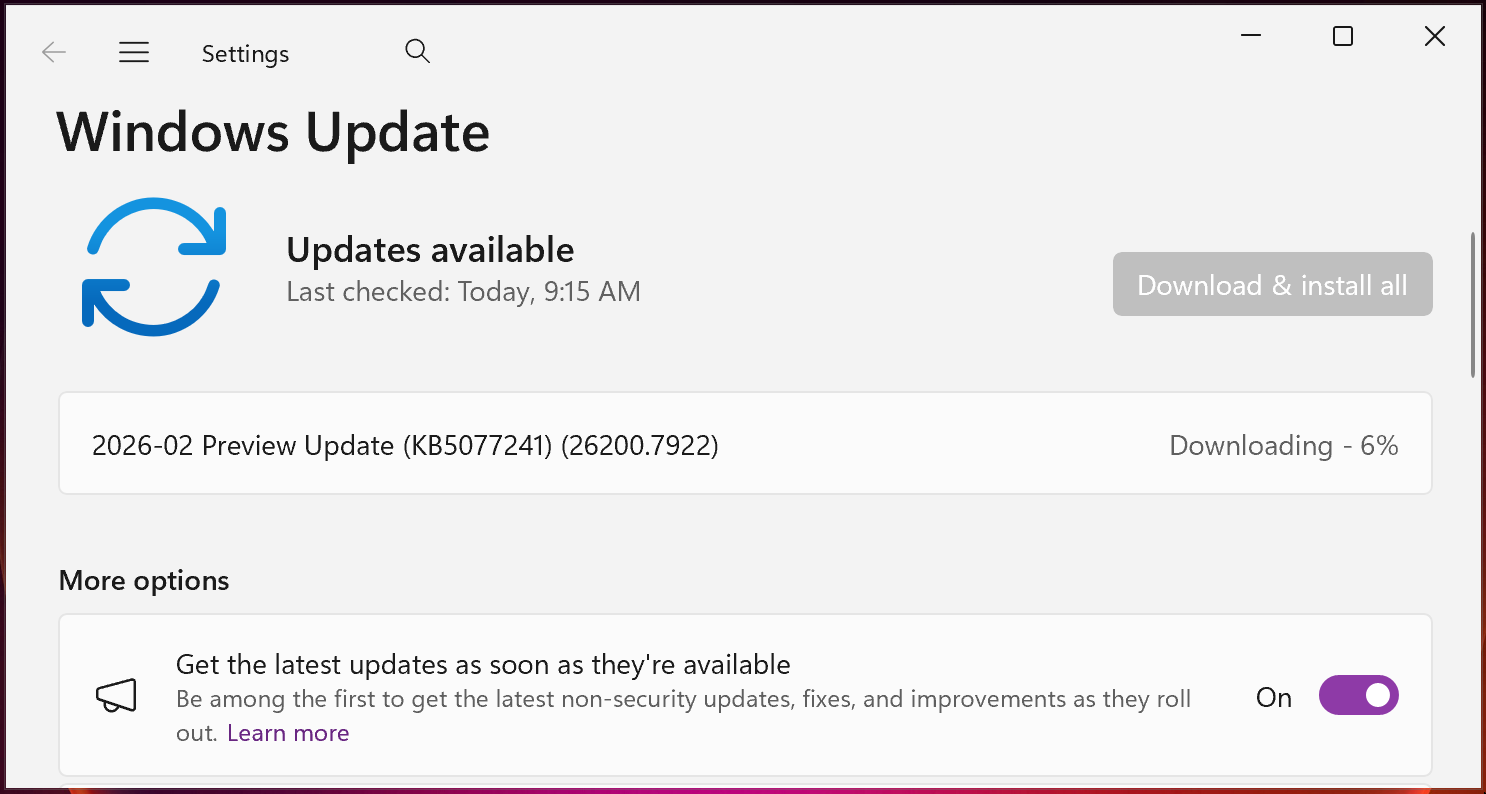
To install KB5077241, users can navigate to Windows Settings, select Windows Update, and then click on ‘Check for Updates.’ As a preview update, it will appear with an option to ‘Download and install.’ Alternatively, the update can be manually downloaded from the Microsoft Update Catalog for offline installation or deployment in managed environments. Upon successful installation, this optional non-security update will elevate Windows 11 25H2 devices to build 26200.7922 and 24H2 devices to build 26100.7922, respectively, reflecting the cumulative nature of these updates.
In conclusion, the Windows 11 KB5077241 update represents a significant step in Microsoft’s ongoing strategy to refine and secure its flagship operating system. From strengthening core security features like BitLocker and Secure Boot to embedding advanced diagnostic tools like native Sysmon and a network speed test, and enhancing fundamental user experiences such as system resume times and File Explorer navigation, this release underscores a comprehensive approach to system evolution. These enhancements collectively contribute to a more robust, secure, and user-friendly Windows 11 experience, catering to the evolving demands of both individual users and complex organizational IT environments, and setting a precedent for future innovations in the platform.




 Ridwan Kamil
 Aura Kasih
 Lisa Mariana