Safa Marwah
Microsoft has recently rolled out a significant optional cumulative update, KB5074105, for Windows 11 environments, incorporating a suite of 32 modifications designed to enhance system reliability and user experience. This comprehensive release targets and resolves several critical operational impediments, including persistent issues related to system boot sequences, user authentication processes, and product activation failures, marking a concerted effort by the Redmond-based technology giant to refine the stability of its flagship operating system.
The release of KB5074105 adheres to Microsoft’s established monthly cadence for non-security preview updates, typically made available towards the conclusion of each month. This strategic timing provides IT administrators and advanced users with a crucial window to evaluate upcoming fixes, new functionalities, and general performance enhancements in a controlled pre-release environment. Unlike the mandatory security-focused "Patch Tuesday" updates, these optional releases are exclusively dedicated to quality improvements, deliberately omitting security patches. This distinction allows organizations to proactively test system compatibility and stability ahead of the broader public deployment scheduled for the subsequent month’s mandatory update cycle, thereby mitigating potential disruptions in enterprise settings.
Among the array of improvements bundled within the January 2025 optional update, several stand out for their direct impact on core system functionality. A notable fix addresses a previously identified anomaly where the Explorer.exe process would unexpectedly freeze or become unresponsive during a user’s initial login attempt, particularly when specific applications were designated to launch automatically at startup. This issue, while seemingly minor, could significantly impede user productivity and create a frustrating onboarding experience for new or reconfigured systems. By rectifying this, Microsoft aims to ensure a smoother, more reliable desktop initialization for all users.
Furthermore, the update tackles critical system responsiveness and boot integrity. One significant correction targets a bug that could cause the entire operating system to cease responding during the startup phase when Windows Boot Manager debugging was actively enabled. This scenario, often encountered by developers or IT professionals engaged in system diagnostics, previously led to severe operational interruptions. Concurrently, KB5074105 resolves instances of iSCSI boot failures, a critical issue for networked storage environments, which manifested as an "Inaccessible Boot Device" error. Such failures can cripple server operations or specialized workstations reliant on network-attached storage for their primary boot volume, highlighting the update’s importance for enterprise infrastructure.
A particularly crucial fix within this month’s preview update addresses a persistent challenge related to Windows license management. The update rectifies a problem where the migration of Windows licenses could fail during system upgrades. This failure often occurred because the personal computer was unable to successfully register its digital license with Microsoft’s activation servers. Digital licenses are a cornerstone of modern Windows activation, linking a user’s license to their hardware or Microsoft account rather than a physical product key. When this registration process falters, users can face activation errors, potentially leading to reduced functionality or persistent activation prompts, undermining the legitimacy and full usability of their operating system. Resolving this ensures a more seamless upgrade path and consistent activation experience for legitimate users, preventing potential administrative headaches and compliance issues.

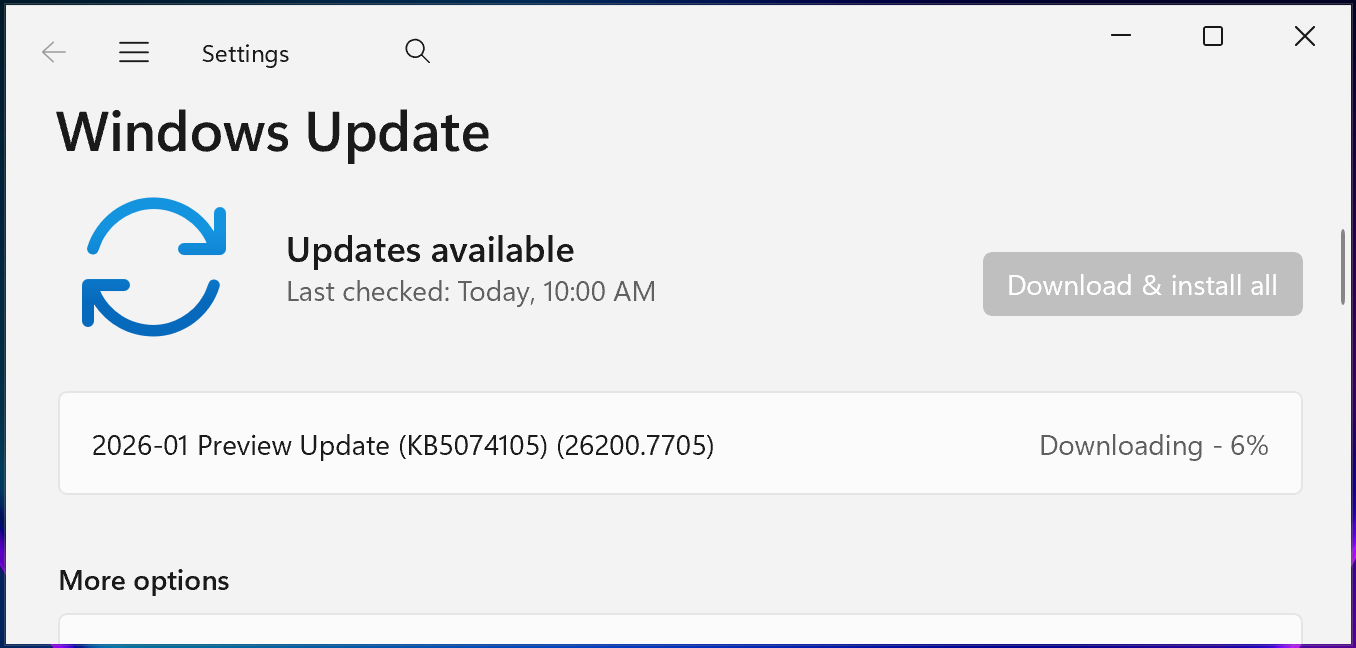
For users and administrators seeking to implement these improvements, the installation process for KB5074105 is straightforward. The update can be accessed via the standard Windows Update interface: users can navigate to Settings, select Windows Update, and then initiate a ‘Check for Updates’ scan. As an optional update, it will not automatically download and install but will be presented with a distinct ‘Download and install’ link, providing users with the agency to choose when to apply the changes. Alternatively, for environments requiring a more controlled or bulk deployment, the cumulative update package can be manually downloaded directly from the Microsoft Update Catalog, offering flexibility for offline installations or integration into existing patch management systems. This dual approach caters to both individual users seeking immediate fixes and IT departments planning staged rollouts.
Upon successful installation, this non-security preview update will advance Windows 11 25H2 devices to build 26200.7705 and Windows 11 24H2 devices to build 26100.7705. These specific build numbers are indicative of the incremental advancements and refinements integrated into the respective versions of the operating system. The distinction between 25H2 and 24H2 refers to different feature release cycles within Windows 11, with the numbers denoting the year and half-year of their initial release. Maintaining separate build numbers for these distinct branches ensures clarity in tracking updates and compatibility for system administrators managing diverse fleets of Windows 11 machines.
Beyond the immediate fixes, Microsoft has also communicated forthcoming adjustments to its update identification and nomenclature practices, signaling a broader strategy to streamline the update experience. In a separate announcement within its message center, Microsoft disclosed that beginning with the January 2026 security update, Windows 11 and Windows Server 2025 updates will be assigned distinct KB identifiers and separate build numbers. This change is specifically designed to eliminate potential confusion among administrators, who previously might have encountered overlapping or ambiguous identifiers for client and server operating systems. The rationale behind this segmentation is to enhance clarity and simplify the management of updates across different operating system platforms, ensuring that IT professionals can more easily discern which updates apply to which systems without requiring extensive cross-referencing. Despite this change in identification, Microsoft reassures users and administrators that the actual installation and management processes for these updates will remain consistent with current procedures.
Complementing this, Microsoft has also adopted simplified titles for its Windows updates starting this month. This initiative aims to make update information more readily comprehensible by removing superfluous technical elements, such as platform architecture details, from the update titles themselves. The goal is to present update information in a more user-friendly and concise manner, reducing the cognitive load on users and administrators when sifting through update logs and documentation. This move reflects a broader industry trend towards greater transparency and accessibility in software documentation, ensuring that critical information is conveyed efficiently and effectively to a wide audience.
Implications for User Experience and IT Administration

The issues addressed in KB5074105, particularly those related to boot, sign-in, and activation, represent fundamental pillars of the Windows operating system’s functionality. For the average end-user, a system that fails to boot reliably or activate correctly presents a significant barrier to productivity and can quickly erode trust in the software. Imagine a scenario where a user, after a fresh installation or an upgrade, is met with an "Inaccessible Boot Device" error or an unresponsive desktop upon login; such experiences are not merely inconvenient but can necessitate time-consuming troubleshooting or professional IT intervention. By diligently tackling these foundational glitches in preview updates, Microsoft demonstrates a commitment to delivering a robust and dependable user experience, aiming to preempt widespread issues before they reach the general public in a mandatory release.
From an IT administration perspective, these fixes carry even greater weight. In large enterprise environments, where hundreds or thousands of Windows 11 devices are deployed, even seemingly minor bugs can escalate into major operational challenges. A consistent boot failure or activation issue across a fleet of machines translates directly into increased help desk tickets, lost employee productivity, and significant resource allocation for remediation. The ability to test these fixes in a preview update environment before their mandatory rollout is invaluable. It allows IT departments to validate the stability of the patches within their specific hardware and software ecosystems, identify any unforeseen conflicts, and prepare their support teams, thereby minimizing potential disruption during "Patch Tuesday." The improved clarity in update identifiers and simplified titles also contributes to more efficient patch management, reducing the risk of misapplication or confusion when dealing with complex update schedules for diverse operating systems.
The Broader Context of Microsoft’s Update Strategy
The continuous release of preview updates like KB5074105 underscores Microsoft’s iterative development philosophy for Windows. Modern operating systems are incredibly complex, interacting with a vast array of hardware configurations, third-party software, and user-specific settings. Despite rigorous internal testing, unexpected issues can arise in real-world scenarios. The preview update mechanism serves as a critical feedback loop, leveraging a broader user base (often IT professionals and early adopters) to identify and refine fixes before they become universally available. This proactive approach is essential for maintaining the agility and responsiveness required to keep a global operating system like Windows 11 stable and secure in a rapidly evolving technological landscape.
The distinction between non-security preview updates and security-focused Patch Tuesday releases is also a deliberate design choice. It allows Microsoft to separate critical security vulnerabilities, which demand immediate and universal patching, from general quality-of-life improvements and bug fixes, which can benefit from a more phased and optional deployment. This structured approach helps in managing the risk associated with updates, ensuring that the most critical security aspects are always prioritized while still providing a mechanism for ongoing system refinement.
Future Outlook
As Windows 11 continues to evolve, the importance of these incremental updates cannot be overstated. The commitment to addressing issues ranging from core boot processes to user activation highlights a focus on foundational stability. The upcoming changes to update identification and simplified titling further illustrate Microsoft’s ongoing efforts to enhance the administrative experience, making it easier for organizations to manage and maintain their Windows environments. Users and IT professionals can anticipate a continued cadence of these preview updates, each contributing to a more robust, reliable, and user-friendly Windows 11 ecosystem, ensuring that the operating system remains a cornerstone of personal computing and enterprise infrastructure. The journey of refining a global operating system is continuous, and each update, no matter how small, plays a vital role in shaping its future stability and usability.




 Ridwan Kamil
 Aura Kasih
 Lisa Mariana
 Ayu Aulia