Aura Kasih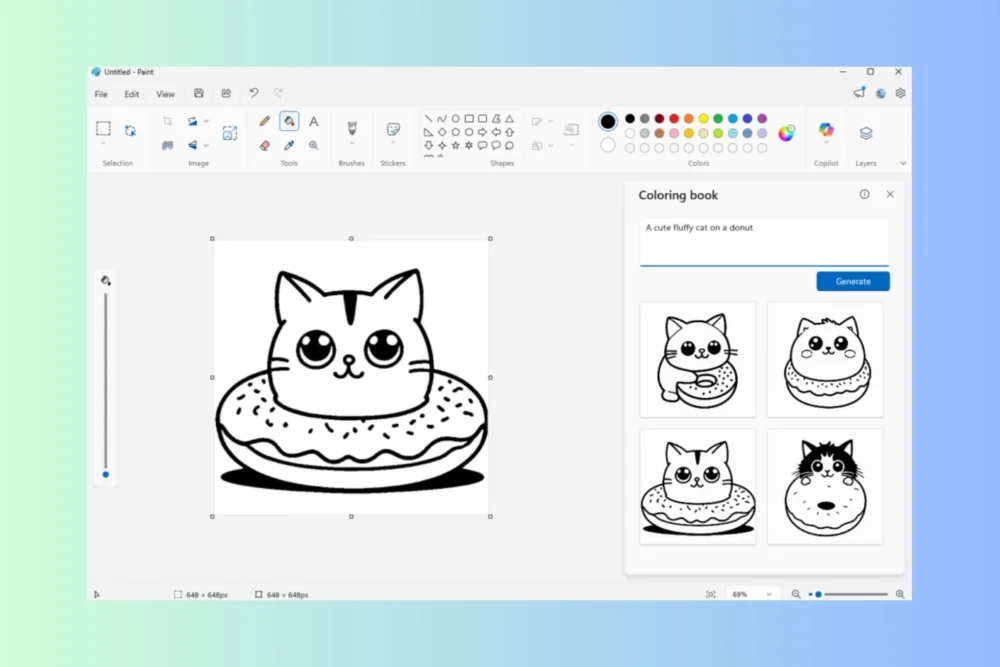
Microsoft has ushered in a new era for its venerable Paint application, integrating advanced artificial intelligence capabilities that empower users to generate intricate coloring book pages and other digital content directly within the familiar interface. These groundbreaking enhancements, currently being piloted with Windows Insiders on Canary and Dev channels for Windows 11, represent a significant leap forward for a tool long associated with basic image manipulation, now poised to become a more sophisticated platform for creative expression.
The integration of generative AI into Microsoft Paint, particularly through its new "Coloring book" feature, marks a fascinating evolution for the ubiquitous Windows application. This functionality, accessible via the Copilot menu, allows users to translate textual descriptions into intricate line art, ideal for coloring. Imagine describing "a whimsical forest scene with friendly woodland creatures" or "an intricate mandala pattern inspired by celestial bodies," and having Paint instantaneously render multiple design options ready for artistic interpretation. This capability transforms Paint from a simple digital canvas into a dynamic content creation engine, democratizing the creation of personalized artistic assets.
The "Coloring book" feature exemplifies Microsoft’s broader strategy of embedding AI across its product suite, making advanced technologies accessible to a wider audience. By leveraging large language models and image generation algorithms, Paint can now understand nuanced textual prompts and translate them into visually coherent and aesthetically pleasing designs. The user interface is designed for intuitive interaction: a user selects the "Coloring book" option, articulates their vision in plain language – perhaps "a majestic dragon soaring over a medieval castle" or "a serene underwater landscape with vibrant coral reefs" – and the application presents a selection of four distinct visual interpretations. Users can then choose their preferred design and seamlessly import it onto the Paint canvas, ready for the application of color, whether through Paint’s digital tools or by printing the outline for traditional media.
While the immediate appeal of generating custom coloring pages is evident for hobbyists, parents seeking engaging activities for children, or individuals looking for a mindful creative outlet, the implications extend far beyond simple entertainment. This AI-driven content generation opens avenues for educators to create bespoke visual aids, for small businesses to quickly design marketing materials or product prototypes, and for artists to rapidly iterate on design concepts. The ability to generate complex line art from a simple text prompt significantly lowers the barrier to entry for visual creation, fostering a more inclusive digital art ecosystem.
It is pertinent to note that the full suite of these advanced AI features, including the "Coloring book" functionality, is currently exclusive to Copilot Plus PCs. This strategic rollout suggests Microsoft’s intent to highlight the unique advantages of its latest hardware, positioning these AI-powered creative tools as key differentiators in a competitive market. However, the broader availability of some AI enhancements, such as an improved fill tolerance slider for the Fill tool, indicates a commitment to enhancing core functionalities across a wider range of devices, ensuring that even users without the latest hardware benefit from incremental improvements in user experience and creative control. This fill tolerance slider, for instance, offers a more granular control over the Flood Fill tool, allowing for greater precision when filling areas with color, a long-requested feature by many digital artists.
Simultaneously, Microsoft’s Notepad application is undergoing a significant AI-powered transformation, moving beyond its traditional role as a rudimentary text editor. The recent update introduces AI-driven features for text manipulation, including "Write," "Rewrite," and "Summarize." These capabilities allow users to interact with their text in more sophisticated ways, generating new content, refining existing prose, or distilling lengthy documents into concise summaries. A key innovation is the streaming of AI-generated results, which means users can see previews of the text appearing in real-time, rather than enduring lengthy processing waits. This immediate feedback loop enhances productivity and makes the AI assistance feel more integrated and responsive.

Beyond these generative AI functionalities, Notepad is also receiving a refreshed welcome experience designed to provide new users with a clear and concise overview of the application’s capabilities. This onboarding improvement is crucial for maximizing user adoption and ensuring that the new AI features are discovered and utilized effectively. Furthermore, Notepad’s support for Markdown syntax has been expanded to include features like strikethrough formatting and nested lists, catering to users who prefer a lightweight markup language for document creation and editing. These enhancements collectively elevate Notepad from a basic utility to a more capable tool for writers, developers, and anyone who frequently works with plain text.
The strategic infusion of AI into these foundational Windows applications signals a profound shift in Microsoft’s approach to user experience. By embedding intelligence directly into the tools that users interact with daily, Microsoft aims to streamline workflows, unlock new creative possibilities, and ultimately make computing more intuitive and powerful. This approach democratizes access to advanced AI technologies, transforming them from specialized tools for experts into accessible features for the everyday user.
The implications of these developments are far-reaching. For the creative industries, the ability to generate bespoke visual content with minimal technical expertise could foster a new wave of independent creators and small-scale digital artists. The speed at which design concepts can be realized and iterated upon will undoubtedly accelerate creative processes across various fields, from graphic design and illustration to game development and digital marketing.
Furthermore, the integration of AI into such fundamental applications addresses the growing demand for personalized digital experiences. Users are increasingly seeking tools that can adapt to their specific needs and preferences. By enabling users to generate content based on their unique prompts, Paint and Notepad are moving towards a more user-centric paradigm, where the software acts as a collaborative partner rather than a passive tool.
Looking ahead, it is reasonable to anticipate further integration of AI across the Windows ecosystem. As AI models become more sophisticated and hardware capabilities continue to advance, we can expect to see even more seamless and powerful AI-driven features emerge in applications ranging from productivity suites to communication platforms. The current enhancements in Paint and Notepad serve as a compelling preview of a future where AI is not an add-on but an intrinsic component of the computing experience, empowering users to achieve more with greater ease and creativity.
The rollout of these features to Windows Insiders represents a critical phase of development, allowing Microsoft to gather valuable feedback and refine the AI algorithms based on real-world usage. This iterative process is essential for ensuring that the technology is not only innovative but also practical and user-friendly. The success of these initial AI integrations will likely pave the way for more ambitious projects, further solidifying Windows’ position as a platform that embraces and drives technological innovation.
The evolution of Microsoft Paint, in particular, is a testament to the transformative power of artificial intelligence. Once primarily known for its pixel-based editing capabilities, it is now emerging as a dynamic platform for generative art, capable of bringing imaginative concepts to life with remarkable speed and fidelity. This reimagining of a classic application underscores the potential for AI to breathe new life into established technologies, making them relevant and powerful for a new generation of users and creative endeavors. The future of digital creation appears increasingly intertwined with intelligent tools, and Microsoft’s latest moves with Paint and Notepad are clear indicators of this unfolding landscape.


 Ayu Aulia
 Ridwan Kamil
 Safa Marwah
 Lisa Mariana