Safa Marwah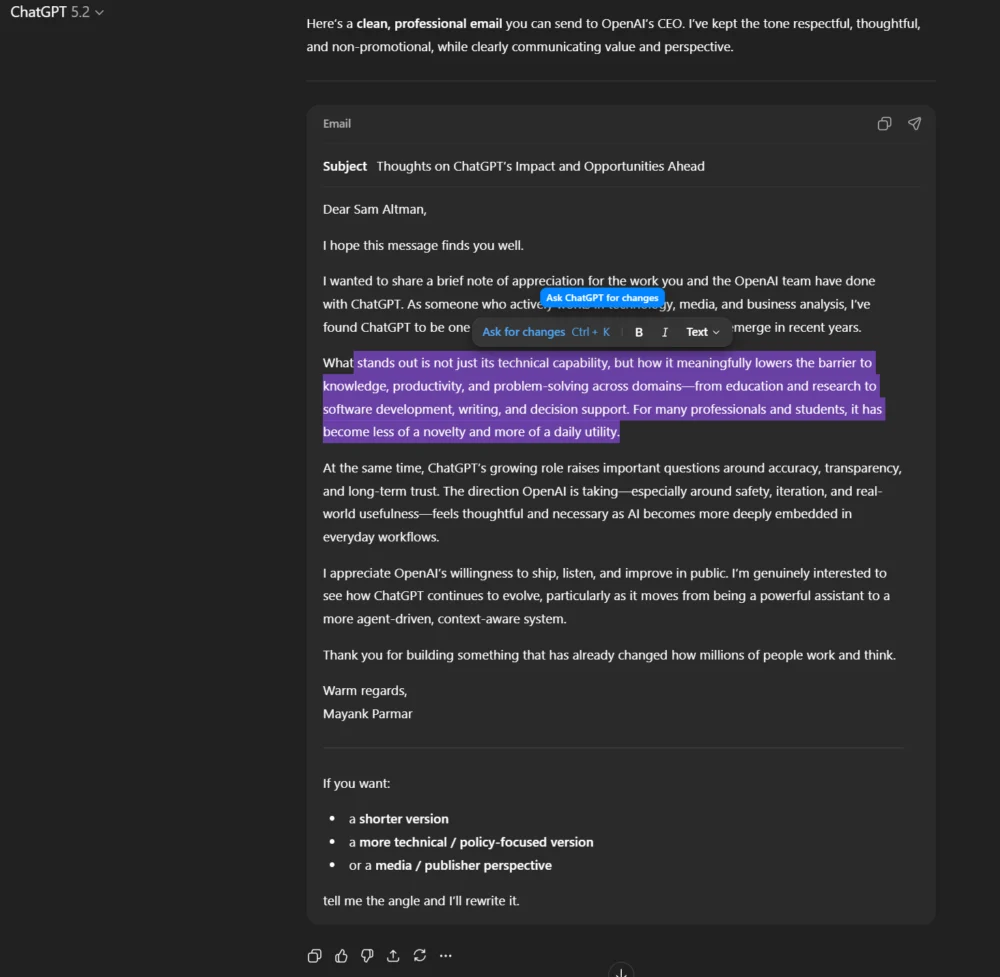
OpenAI has recently initiated a significant refinement of ChatGPT’s user interface, introducing adaptive formatting blocks designed to transform the AI’s output from generic conversational text into structured, task-specific content, thereby repositioning the platform as a more direct and intuitive productivity tool. This strategic enhancement moves beyond the traditional monolithic chat window, allowing ChatGPT to dynamically present generated content in formats that mirror the intended application, such as an email draft or a document outline, fundamentally altering user interaction and utility.
Historically, large language models (LLMs) like ChatGPT have operated primarily as sophisticated text generators, presenting all outputs in a uniform, unformatted stream. While remarkably capable of producing diverse content—from complex code snippets to creative narratives and professional correspondence—the delivery mechanism often lacked the contextual presentation and direct manipulability expected of dedicated software applications. For instance, requesting an email draft would yield plain text, necessitating manual copying and pasting into an email client, followed by formatting and editing. This disconnect between the AI’s generative prowess and the practical application of its output represented a notable friction point in the user workflow, limiting the seamless integration of AI assistance into daily tasks. The inherent design of a chat interface, optimized for rapid, back-and-forth dialogue, proved less ideal for managing and refining structured content. This limitation, while not diminishing the underlying intelligence of the LLM, certainly impacted the perceived efficiency and user-friendliness when engaging in task-oriented operations.

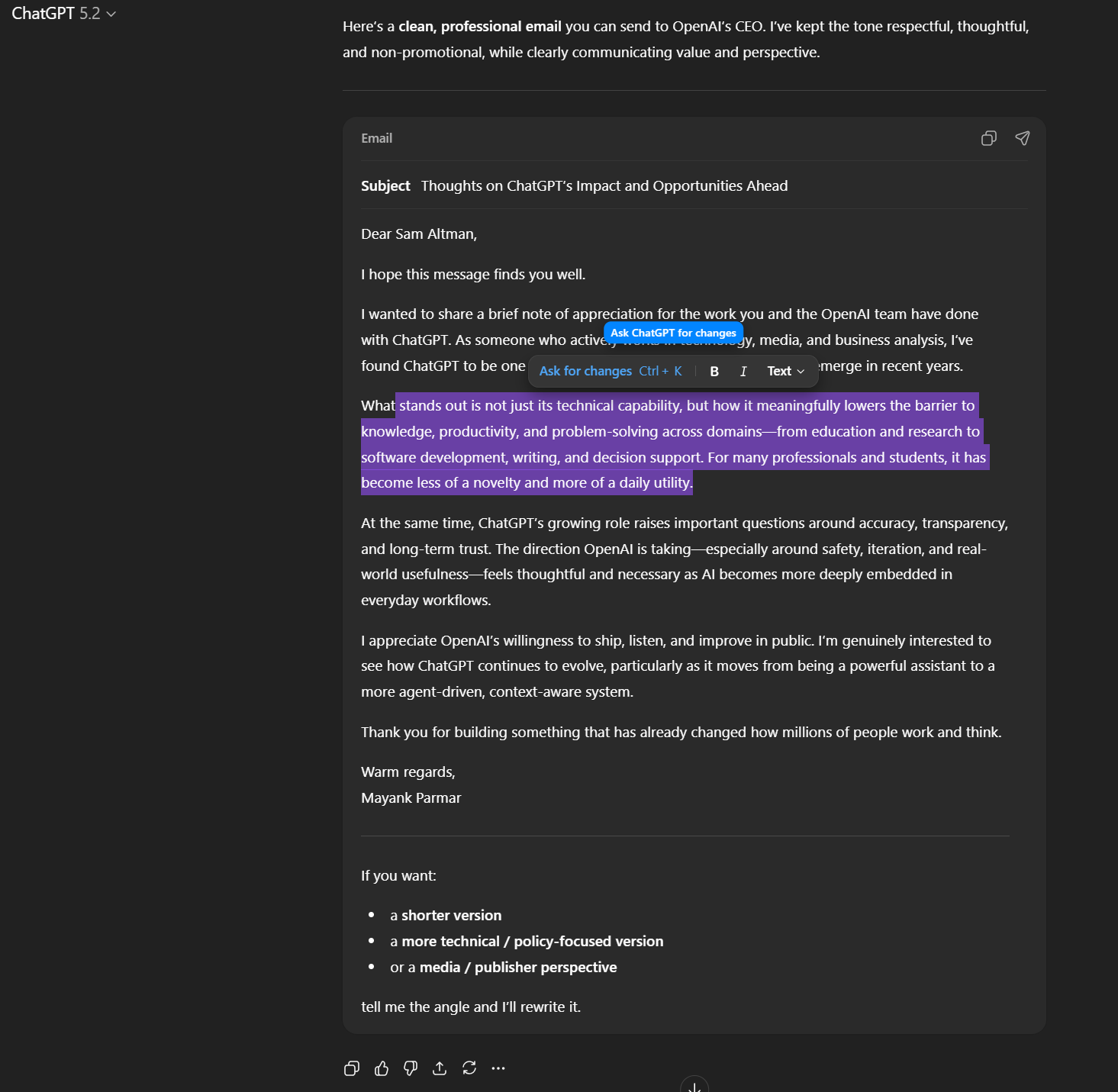
Recognizing this critical gap, OpenAI’s introduction of "formatting blocks" marks a pivotal evolution in the platform’s user experience (UX) design. These blocks are not merely aesthetic changes; they represent a fundamental shift in how ChatGPT interacts with and presents information to the user. When a user prompts ChatGPT to generate a specific type of content—such as an email, a blog post, or a report draft—the AI no longer delivers a flat text output. Instead, it now renders the content within a specialized, contextually aware block that inherently understands the structural requirements of that content type. For example, an email generated by ChatGPT will appear within a block that visually resembles an email composition window, complete with designated areas for sender, recipient, subject line, and body, rather than just a continuous stream of text.
A key component of this new functionality is the integrated mini-editor toolbar, which dynamically appears when text within these rich-text areas is highlighted. This immediate access to common formatting options—such as bolding, italicizing, creating bulleted or numbered lists, and potentially even heading styles—brings a familiar paradigm of document editing directly into the ChatGPT interface. This functionality significantly reduces the steps traditionally required to transform AI-generated text into a polished, usable document. Users can now perform immediate, in-line adjustments and refinements without exporting the text to an external word processor or email client. This on-the-fly editing capability not only streamlines the workflow but also fosters a more iterative and collaborative interaction with the AI, allowing users to fine-tune outputs directly within the generative environment. The experience begins to mirror that of using established productivity suites like Microsoft Word or Google Docs, where formatting and content creation are intrinsically linked.
The strategic implications of these formatting blocks are multi-faceted, extending beyond mere cosmetic improvements. From a user perspective, the most immediate benefit is a substantial reduction in cognitive load and operational friction. Presenting content in its intended format makes the output immediately actionable and comprehensible. Users no longer need to mentally parse a block of text and then manually apply formatting; the AI proactively structures the information, allowing for quicker comprehension and more efficient subsequent actions. This directly translates to enhanced productivity, as the time saved in post-generation formatting and contextualization can be reinvested into higher-value tasks or further refinement of the AI’s output. The familiarity of rich-text editing tools also lowers the barrier to entry for new users and enhances the experience for seasoned professionals, who are accustomed to these interactive elements in their daily software applications.

For OpenAI, this enhancement represents a crucial step in positioning ChatGPT not just as a conversational agent but as a foundational component of a broader productivity ecosystem. By embedding robust formatting and editing capabilities, ChatGPT moves closer to becoming a central workspace where ideas are generated, refined, and prepared for deployment. This strategic pivot allows OpenAI to compete more directly with specialized software applications that traditionally handle document creation, email composition, and content management. It signifies a move towards making ChatGPT an indispensable utility, deeply integrated into professional workflows rather than a supplementary tool. This could lead to increased user engagement, longer session times, and ultimately, greater adoption across diverse professional domains. The platform evolves from being a content producer to a content preparer and refiner, significantly broadening its value proposition.
The gradual rollout of this feature, with promises of support for additional formats in the future, indicates a deliberate and iterative development strategy. This phased implementation allows OpenAI to gather user feedback, refine the existing functionalities, and carefully plan the expansion into more complex content types. Future iterations could potentially include advanced document structuring (e.g., table creation, image insertion placeholders, advanced bibliography formatting), integration with external content repositories, or even collaborative editing features akin to shared document platforms. Such expansions would further solidify ChatGPT’s role as a comprehensive content creation and management platform. Imagine an AI not only drafting a research paper but also formatting it according to specific academic guidelines, complete with citations and a table of contents, all editable within the same interface.
Moreover, this development reflects a broader industry trend towards creating more intuitive and application-like interfaces for AI systems. As AI becomes more sophisticated and capable of handling complex tasks, the interface must evolve to match these capabilities, moving away from simple command-line interactions or basic chat windows. The goal is to make AI feel less like a separate entity responding to prompts and more like an integrated, intelligent assistant embedded directly within the user’s workflow. This human-computer interaction paradigm prioritizes usability, efficiency, and a seamless flow between human intent and AI execution. Other AI tools and platforms are also exploring similar avenues, integrating AI capabilities directly into familiar software environments, whether it’s a spreadsheet program, a design suite, or a code editor. OpenAI’s move positions ChatGPT at the forefront of this evolution in AI interface design.
The implications for various user personas are substantial. For professional writers and marketers, the ability to generate and immediately format blog posts, social media updates, or advertising copy within ChatGPT saves considerable time and effort. For business professionals, drafting emails, meeting agendas, or executive summaries becomes a more fluid process. Students can benefit from structured outlines and report drafts that are immediately editable. Developers might see structured code blocks that are easier to review and export. The flexibility afforded by these formatting blocks caters to a diverse range of use cases, making the AI’s output more universally adaptable and immediately useful.
While the introduction of formatting blocks represents a significant leap forward, the journey towards a fully integrated AI workspace is ongoing. Future challenges and opportunities will likely revolve around deeper customization options for these blocks, more robust integration with third-party applications and cloud services, and the ability to define custom block types for niche professional requirements. Ensuring seamless performance across different devices and maintaining a balance between rich functionality and interface simplicity will also be critical. The ultimate vision is an AI environment that not only understands and generates content but also intelligently structures, formats, and helps manage it, truly transforming the way individuals and organizations leverage artificial intelligence in their daily operations. This ongoing evolution underscores OpenAI’s commitment to refining the user experience, making AI not just powerful, but also profoundly practical and user-centric.




 Ridwan Kamil
 Aura Kasih
 Lisa Mariana
 Ayu Aulia