Aura Kasih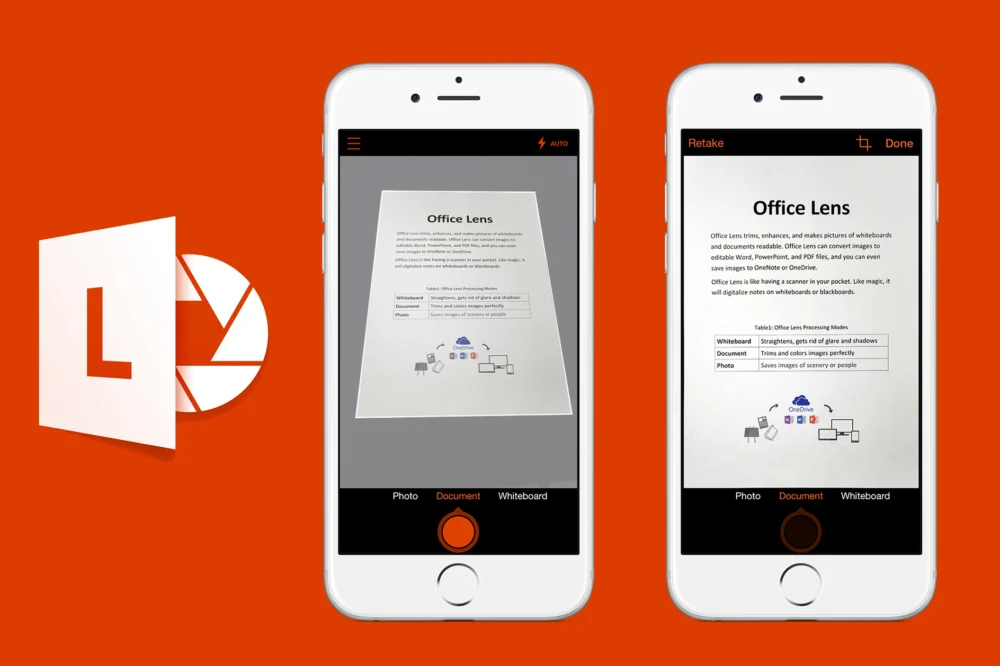
Microsoft is orchestrating a strategic consolidation of its mobile document scanning functionalities, signaling the impending discontinuation of the standalone Microsoft Lens application for both iOS and Android platforms. This move, slated for February 9th with complete functional retirement by March 9th, represents a deliberate pivot towards integrating these capabilities directly into its broader cloud-based ecosystem, specifically within the OneDrive application. The decision underscores Microsoft’s ongoing commitment to streamlining its product portfolio and enhancing user experience by centralizing core features within its established productivity suite.
The retirement of Microsoft Lens, formerly widely recognized as Office Lens, marks the culmination of an era for a dedicated mobile scanning utility that has served users for nearly a decade. Launched initially in 2015 on iOS and Android, following its precursor on Windows Phone, the app was a prominent example of Microsoft’s "mobile-first" strategy during that period. It offered a robust set of features designed to digitize physical documents, whiteboards, and receipts with impressive accuracy and integration. Its ability to intelligently crop, enhance, and even convert scanned content into editable formats like Word and PDF documents made it an invaluable tool for professionals and students alike seeking to bridge the gap between the physical and digital realms. The app’s tight integration with other Office applications further solidified its utility, allowing for seamless workflows and immediate access to scanned materials within familiar productivity environments.
This strategic divestment from a standalone app is not indicative of a diminished commitment to mobile scanning, but rather a calculated evolution of Microsoft’s approach to digital productivity. The core functionalities that made Microsoft Lens a valuable tool are being absorbed into OneDrive, Microsoft’s cloud storage and synchronization service. This integration means that users will continue to benefit from the sophisticated scanning capabilities, including automatic edge detection, perspective correction, and image enhancement, all within the familiar interface of OneDrive. The ability to capture images of documents, whiteboards, and receipts, and subsequently save, edit, and convert them into editable Word or PDF formats, will remain readily accessible. This consolidation aims to provide a more cohesive user experience, reducing the need to switch between multiple applications for related tasks. By embedding scanning directly into OneDrive, Microsoft reinforces the app’s role as a central hub for document management and digital transformation, allowing users to seamlessly capture, organize, and access their important information from any device.
The implications of this transition extend beyond mere app retirement. It signifies a broader trend within the technology industry towards platform integration and the reduction of application bloat. In an increasingly interconnected digital landscape, users often prefer unified experiences where core functionalities are readily available within their primary productivity or storage solutions. For Microsoft, this means leveraging the vast user base of OneDrive and further embedding its value proposition. By making advanced scanning a native feature of OneDrive, Microsoft is not only simplifying the user journey but also potentially increasing engagement with its cloud services. This move is likely to enhance the utility of OneDrive for a wider range of users, from individuals managing personal documents to enterprises digitizing vast amounts of information.
Furthermore, the retirement of Microsoft Lens can be viewed as a strategic refinement of Microsoft’s mobile application strategy. In its earlier years, Microsoft heavily invested in developing distinct mobile applications for its services to capture market share on emerging platforms. However, as the mobile ecosystem has matured and user expectations have evolved, the emphasis has shifted towards creating integrated experiences within core platforms. This approach allows for more efficient development, easier maintenance, and a more consistent user interface across devices. By consolidating features into OneDrive, Microsoft can dedicate resources to further enhancing the scanning capabilities within that platform, ensuring continuous improvement and adaptation to user needs. This strategic alignment also supports Microsoft’s broader vision of a connected digital workspace, where information flows seamlessly between devices and applications.

The technical underpinnings of Microsoft Lens were always impressive, employing advanced image processing algorithms to achieve professional-quality scans. Features like automatic cropping and straightening, color correction, and noise reduction were crucial in transforming a smartphone camera into a capable document scanner. The ability to convert handwritten notes on whiteboards into editable text, or to extract information from business cards, demonstrated a sophisticated understanding of optical character recognition (OCR) and image analysis. By transferring these advanced capabilities to OneDrive, Microsoft ensures that users will continue to benefit from this cutting-edge technology. The OneDrive integration is expected to offer similar, if not enhanced, performance, ensuring that the transition is seamless from a functional perspective.
From an analytical standpoint, this move by Microsoft reflects a mature understanding of market dynamics and user behavior. The proliferation of single-purpose applications can lead to user fatigue and fragmentation of digital workflows. Consumers and professionals alike are increasingly seeking integrated solutions that simplify their digital lives. By bringing the scanning functionality into OneDrive, Microsoft is directly addressing this demand. It allows users to capture a document, organize it within their cloud storage, and then immediately begin working with it in other Microsoft applications, such as Word or OneNote, without the need for intermediate steps or separate apps. This holistic approach to document management is a key differentiator in the competitive productivity software market.
Looking ahead, the continued evolution of mobile scanning technology within OneDrive is likely to focus on enhanced AI-driven features. We can anticipate improvements in OCR accuracy, particularly for complex documents and diverse languages. The integration of smart indexing and search capabilities within OneDrive could allow users to quickly find specific information within their scanned documents, further enhancing the value of the platform. Moreover, as augmented reality (AR) technology matures, there is potential for even more innovative scanning experiences, such as real-time document capture with intelligent overlay and annotation. Microsoft’s commitment to cloud-based solutions suggests a future where scanning is not just about digitizing documents but also about intelligently extracting and utilizing the information contained within them.
The retirement of Microsoft Lens also presents an opportunity for users to re-evaluate their digital workflows. Those who relied heavily on the standalone app will need to adapt to using OneDrive for their scanning needs. However, given the seamless integration and the continued availability of advanced features, this transition is expected to be relatively smooth. For users who have not yet fully embraced cloud-based document management, this event may serve as a catalyst to explore the full capabilities of OneDrive and its integrated scanning functionality. Microsoft’s investment in OneDrive as a central hub for productivity underscores its commitment to a connected and efficient digital future.
In conclusion, Microsoft’s decision to retire the standalone Microsoft Lens application and integrate its functionalities into OneDrive represents a strategic move towards platform consolidation and enhanced user experience. This evolution aligns with broader industry trends and reinforces Microsoft’s commitment to providing a seamless and integrated suite of productivity tools. While the dedicated app may be departing, the powerful scanning capabilities it offered will continue to empower users within the robust and ever-expanding OneDrive ecosystem. This strategic refinement is poised to streamline digital workflows and further solidify Microsoft’s position as a leader in cloud-based productivity solutions.




 Lisa Mariana
 Safa Marwah
 Ayu Aulia